What Is The Amazing Digital Circus Cursor?
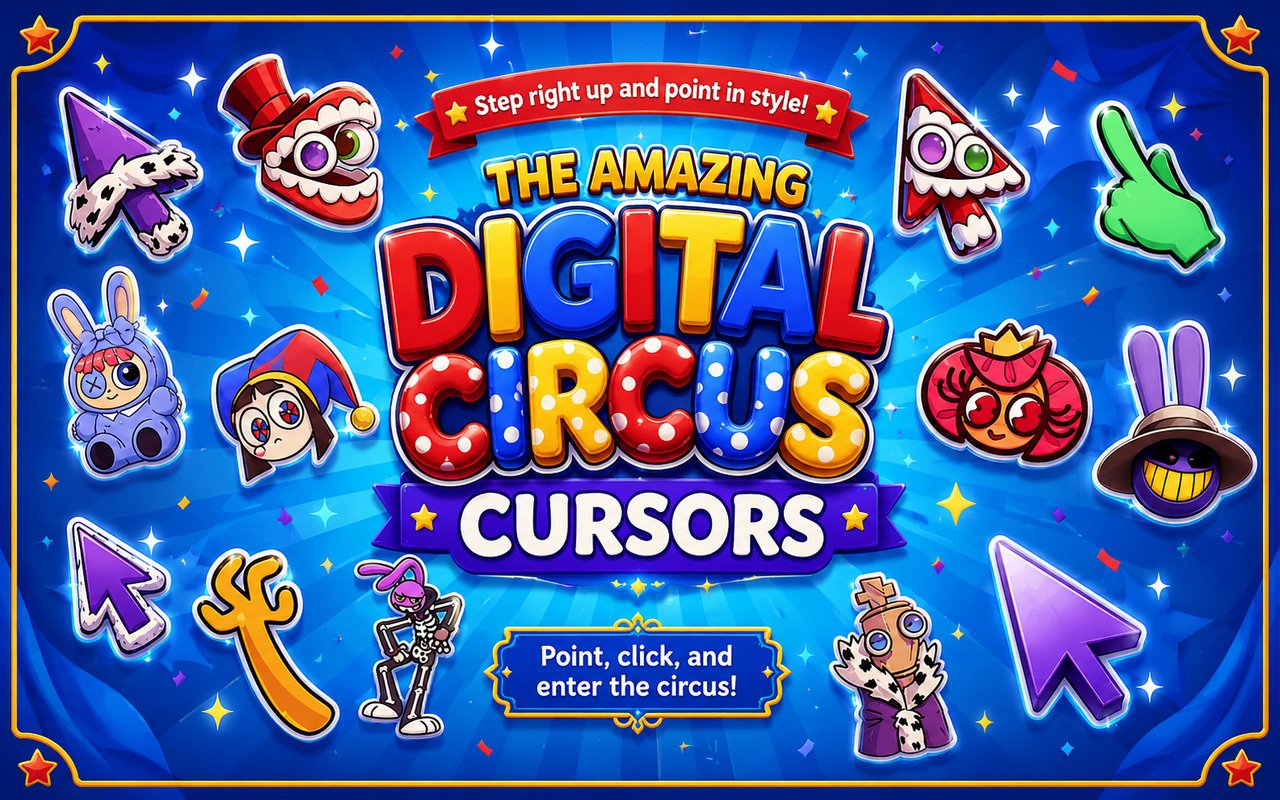
Amazing Digital Circus Cursor is a Chrome extension that replaces your standard browser cursor with custom designs inspired by The Amazing Digital Circus animated series. Once installed, your pointer transforms into characters and elements drawn directly from the show, appearing across every website you visit in Chrome. It is a simple way to bring a slice of the digital circus into your everyday browsing.
The Amazing Digital Circus is a darkly comedic animated series following a group of humans trapped inside a surreal, glitchy virtual world run by an unsettlingly cheerful ringmaster. Characters like Pomni, the anxious jester struggling to hold onto her sanity, and Jax, the mischievous and self-serving rabbit, have quickly become fan favorites since the show’s release. The world itself is packed with bizarre creatures, abstract environments, and a distinctly chaotic charm that sets it apart from other animated productions.
The extension is a natural fit for fans of the series who want their browser to reflect their enthusiasm for the show during gaming sessions, studying, or general daily browsing.
Key Features of The Amazing Digital Circus Cursor Extension
Complete Amazing Digital Circus Cursor Collection
The collection draws from the core cast and world of The Amazing Digital Circus, featuring Pomni, Jax, Caine, Kinger, and Gummigoo alongside additional designs that capture the show’s eccentric aesthetic. Each cursor is crafted to represent a recognizable character or element from the series, giving fans a meaningful set of options to choose from.
- Pomni cursor
- Jax cursor
- Caine cursor
- Kinger cursor
- Gummigoo cursor
- The Amazing Digital Circus logo and world-themed designs
Original Animation Art Style
The cursors closely replicate the visual identity of The Amazing Digital Circus, with its bold outlines, saturated colors, and exaggerated character proportions. Pomni’s blue and pink jester palette and Jax’s deep purple tones are rendered faithfully, maintaining the look of the original animation. The designs capture the unsettling yet playful aesthetic that defines the series, balancing bright carnival colors with the slightly off-kilter expressions that make each character instantly recognizable. This attention to style means the cursors feel like genuine extensions of the show rather than generic fan art.
Adjustable Cursor Size
The extension includes a size slider that lets you scale your cursor up or down to suit your screen and personal preference. Whether you are working on a compact laptop screen or a large desktop monitor, you can find a size that feels comfortable and remains easy to track. Larger sizes can be particularly useful for detailed browsing sessions where visibility matters.
Favorites System for Quick Switching
You can bookmark your preferred cursor designs using the built-in favorites system, saving them for instant access without having to browse through the full library each time. This is especially handy if you like switching between Pomni for casual browsing and Caine for something a little more theatrical. Your saved favorites persist across browser sessions, so your choices are always ready when you reopen Chrome.
Lightweight and Performance-Friendly
The extension runs quietly in the background without placing any measurable load on Chrome’s speed, memory, or page load times. It is designed to be unobtrusive, functioning just as smoothly on older machines as it does on high-performance setups. Even during graphic-intensive browsing or gaming sessions, the cursor extension does not introduce lag or slowdown.
Easy Toggle On and Off
A single click on the extension icon activates or deactivates the custom cursor, letting you revert to Chrome’s default pointer whenever you need it for a video call, a work application, or any site where a standard cursor feels more appropriate. Switching back on is equally instant, and the extension automatically remembers the last cursor you had active so you never have to reselect it.
How to Install The Amazing Digital Circus Cursor
- Open Google Chrome on your desktop or laptop.
- Go to the Chrome Web Store and search for Amazing Digital Circus Cursor.
- Click the extension listing to open its detail page.
- Click Add to Chrome and confirm when the popup appears.
- Click the extension icon in your Chrome toolbar to open the cursor library.
- Select any design to activate it immediately — no browser restart needed.
Why Amazing Digital Circus Cursor Fans Love This Extension
The Amazing Digital Circus built an unusually passionate fanbase in a short period of time, largely because its characters feel genuinely compelling despite the absurdity of their situation. Pomni’s visible distress at being trapped in the circus resonates with viewers in a way that goes beyond simple cartoon entertainment, while characters like Kinger’s fragmented, anxious energy and Jax’s casual cruelty give the show real emotional texture. Having these characters appear at the tip of your cursor every time you move your mouse is a small but constant reminder of how much the show has meant to those who followed it closely. For fans who have rewatched episodes, followed fan communities, or created their own art inspired by the series, this extension feels like a natural extension of that enthusiasm.
Students who browse with music or videos running in the background, gamers who keep Chrome open alongside their sessions, and creative professionals who spend long hours at a desk all find that a themed cursor adds a personal touch to an otherwise utilitarian tool. For younger users and those deeply embedded in The Amazing Digital Circus fandom, seeing Pomni or Jax on screen during a regular browsing session keeps the connection to the show alive between new episodes.
Frequently Asked Questions
Does this extension work on all websites?
The cursor is active across virtually all websites you visit in Chrome. A small number of sites with strict content security policies may limit custom cursor behavior, but this is uncommon and the extension works normally on the vast majority of pages.
Can I use multiple Amazing Digital Circus Cursor cursors at once?
Only one cursor can be active at a time, but switching between designs is quick. The favorites system lets you save your preferred characters and switch between them in seconds without scrolling through the entire collection.
Will this extension slow down my browser?
No. The Amazing Digital Circus Cursor extension is built to be lightweight and runs quietly in the background. It has no noticeable impact on Chrome’s speed, memory usage, or page load performance.
Is the Amazing Digital Circus Cursor extension free?
Yes. The extension is completely free to download and use from the Chrome Web Store. You get access to the full cursor library without any subscription or in-app purchases.




Community comments
Comments are reviewed before they appear publicly.