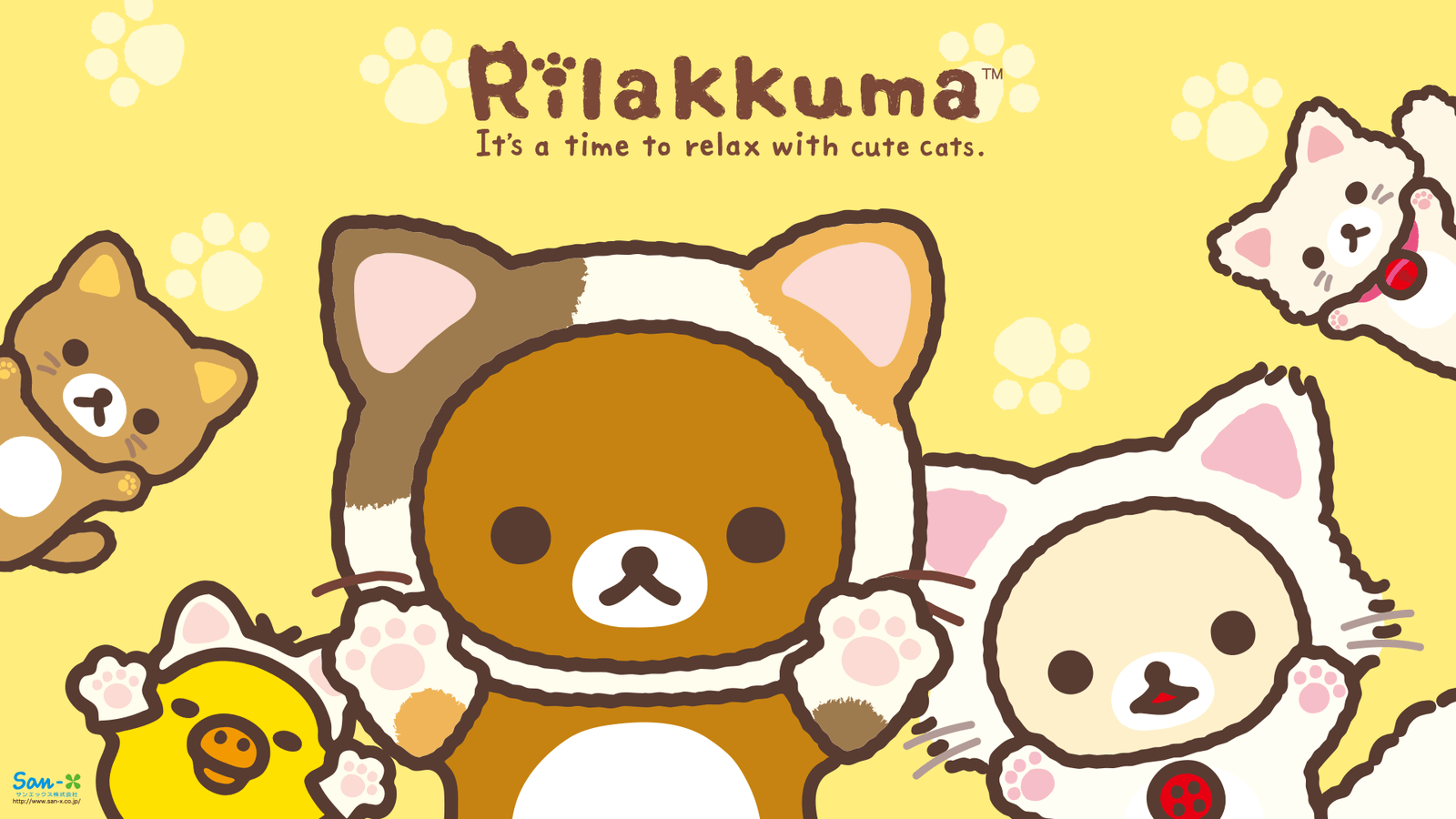
Rilakkuma’s peaceful personality and soft brown-and-cream colors make him a favorite among fans of cute Japanese character art. Rilakkuma Wallpapers New Tab brings that cozy aesthetic to Google Chrome with HD bear-themed backgrounds, calming illustrations, and familiar browsing tools.
If you enjoy kawaii designs, relaxing cartoon scenery, or Rilakkuma’s laid-back world, this extension gives your browser a cheerful and inviting appearance. Every new tab combines themed wallpaper imagery with a smart search bar, customizable clock and date, and quick shortcuts to popular websites.
Give Chrome a Cozy Look With HD Rilakkuma Wallpapers
A great Rilakkuma wallpaper can make an ordinary browser page feel warmer. The character’s rounded design, gentle expressions, and recognizable brown color palette are especially suited to calm cartoon backgrounds and cute minimalist illustrations.
The extension displays an HD Rilakkuma-themed wallpaper on each new Chrome tab. Its exact images, supporting characters, and scenes depend on the wallpaper collection included with the extension, so check the Chrome Web Store screenshots to see the available designs.
Key Features of Rilakkuma Wallpapers New Tab
HD Rilakkuma and Kawaii Bear Wallpapers
Enjoy handpicked high-resolution Rilakkuma-inspired character artwork, cute bear designs, and cozy Japanese cartoon aesthetics that add personality to your browser.
Smart Search Bar
Search the web from your new tab with your existing default search engine. The extension does not change the search provider you have selected in Chrome.
Clock and Date Display
Keep the time and date in view while enjoying the wallpaper. Four screen positions and four display formats let you choose a layout that works with the artwork.
Quick Website Shortcuts
Open YouTube, ChatGPT, Instagram, and X with one-click shortcut tiles, making frequently visited websites easy to reach.
Keyboard Shortcuts for Search
Press / or Ctrl+K to focus the search field and start typing with fewer clicks.
Privacy-Focused Browsing
No account or sign-in is required, and the extension is designed without browsing activity tracking. Your layout and shortcuts remain in your own browser. It uses the search permission, not host permissions to read the websites you visit. Shortcut icons are fetched through Google’s public favicon service.
Why Rilakkuma Makes a Great Chrome Wallpaper Theme
Rilakkuma is a character from Japanese company San-X whose name evokes relaxation. His gentle appearance and unhurried personality have helped him become recognizable among fans of kawaii art, stationery, plush toys, and cozy character illustrations.
A Rilakkuma-themed Chrome new tab is a natural fit for cute wallpaper collectors, San-X fans, students who enjoy soft study aesthetics, and anyone who prefers warm, playful visuals instead of a plain background.
Meet Rilakkuma and His Friends
Rilakkuma – The Relaxed Brown Bear
Rilakkuma is best known for his round ears, cream-colored muzzle, and relaxed demeanor. His simple shape and warm brown tones lend themselves to everything from minimalist character portraits to playful illustrated scenes.
Korilakkuma – The Adorable White Bear
Korilakkuma is Rilakkuma’s mischievous white bear companion. The contrast between Korilakkuma’s lighter design and Rilakkuma’s brown fur creates charming combinations for group character artwork.
Kiiroitori – The Little Yellow Bird
Kiiroitori is the small yellow bird often seen alongside Rilakkuma and Korilakkuma. Bright yellow adds a cheerful accent to the soft colors typically associated with the characters.
Chairoikoguma – The Little Brown Bear
Chairoikoguma is another character from the wider Rilakkuma world. Illustrations featuring this little brown bear offer an additional cute style for fans of San-X character artwork.
These are recognizable characters associated with Rilakkuma. The extension’s exact wallpaper selection may not feature every character; consult its screenshots for the included images.
Popular Rilakkuma Wallpaper Aesthetics
Cute and Kawaii Rilakkuma Backgrounds
Rounded shapes, small character expressions, and soft colors make Rilakkuma illustrations particularly appealing for fans of kawaii design. Simple character art can add warmth without overwhelming the browser page.
Pastel Rilakkuma Wallpapers
Light beige, peach, cream, dusty pink, and pale yellow work well with Rilakkuma’s familiar colors. Pastel-themed designs create a calm visual atmosphere that suits both casual browsing and a cozy digital workspace.
Minimalist Bear Wallpapers
A single Rilakkuma illustration on a solid background or subtle gradient can make a polished, uncluttered new tab. If you like understated browser visuals, Minimal Wallpapers New Tab offers another simple aesthetic.
Cozy Bedroom and Relaxing Cartoon Scenes
Rilakkuma’s laid-back personality fits illustrations featuring cushions, blankets, snacks, and peaceful indoor settings. Cozy scenery can create a gentle, welcoming look for a browser background.
Rilakkuma Friends and Group Illustrations
Artwork featuring Rilakkuma with Korilakkuma, Kiiroitori, and other companions can bring a playful sense of friendship to the screen. Group arrangements may use a wider color palette and more expressive compositions.
Rilakkuma Compared With Other Cute Cartoon Themes
Rilakkuma has a distinctively relaxed, neutral-toned look. Other popular character wallpapers offer different styles: Pompompurin Wallpapers focus on a golden-yellow puppy, while Little Twin Stars Wallpapers are associated with dreamy pastel skies and cute fantasy imagery.
If you enjoy nostalgic comic characters, Peanuts Wallpapers provides another cozy option. For playful inspirational art, explore Hello Kitty Quotes Wallpapers. These collections provide different ways to give Chrome a personal look.
Make a Relaxing New Tab Layout
A good wallpaper layout balances character artwork with the information you use. Try placing the clock away from a character’s face, keeping the search bar easy to see, and using shortcut tiles for your most common destinations.
Rilakkuma’s soft colors can be a pleasant choice for users who prefer a quieter visual style. The theme does not promise better focus or productivity, but it can make your browser feel more comfortable and familiar.
How to Install Rilakkuma Wallpapers New Tab in Chrome
- Find Rilakkuma Wallpapers New Tab on the Chrome Web Store when its listing becomes available.
- Open the verified listing and select Add to Chrome.
- Confirm the installation by clicking Add extension.
- Open a new Chrome tab to see a Rilakkuma-themed wallpaper.
- Adjust the available clock, date, and display settings to match your preferences.
Check the Chrome Web Store listing for current availability, screenshots, publisher information, and permissions before installing.
Frequently Asked Questions (FAQ)
What is Rilakkuma Wallpapers New Tab?
It is a Chrome extension that displays HD Rilakkuma-themed wallpaper backgrounds on the new tab page while providing search, clock, date, keyboard shortcuts, and website shortcuts.
Who created Rilakkuma?
Rilakkuma is a character developed by San-X, a Japanese company known for cute character goods and illustrations.
Does the extension display a Rilakkuma wallpaper on every new tab?
Yes. Every new Chrome tab showcases a wallpaper from the extension’s included Rilakkuma-themed collection.
Are Korilakkuma and Kiiroitori included?
Korilakkuma and Kiiroitori are well-known Rilakkuma companions. Their presence in particular wallpapers depends on the included images; check the Chrome Web Store screenshots for exact coverage.
Is Rilakkuma a Sanrio character?
No. Rilakkuma belongs to San-X, not Sanrio. Both companies are known for popular Japanese character designs.
Will the extension change my default search engine?
No. Search uses your currently selected default engine and does not change it.
Can I change the position of the clock and date?
Yes. The extension offers four positions and four formats for the clock and date display.
Which shortcut websites are available?
One-click tiles link to YouTube, ChatGPT, Instagram, and X.
Does Rilakkuma Wallpapers track browsing activity?
It is designed without browsing activity tracking and does not request host permissions to read the websites you visit.
Does it change my computer desktop wallpaper?
No. It customizes the Chrome new tab page rather than your Windows or macOS desktop background.
Is this an official San-X or Rilakkuma extension?
No. This is an unofficial fan-made extension, not affiliated with or endorsed by San-X or other rights holders.
How do I remove the extension?
Open Chrome’s Extensions management page, locate Rilakkuma Wallpapers New Tab, and select Remove.
Bring Cozy Rilakkuma Charm to Chrome
Rilakkuma Wallpapers New Tab combines cute bear artwork with practical everyday browser features. With HD backgrounds, smart search, a customizable clock and date, and popular website shortcuts, it offers a playful way to personalize each new tab.
Visit the extension’s Chrome Web Store listing when available to review its latest screenshots, permissions, and installation details.
Unofficial fan-made extension. Rilakkuma, Korilakkuma, Kiiroitori, Chairoikoguma, character names and designs, associated artwork, and trademarks belong to San-X and their respective rights holders. This extension is not affiliated with or endorsed by them.


Community comments
Comments are reviewed before they appear publicly.