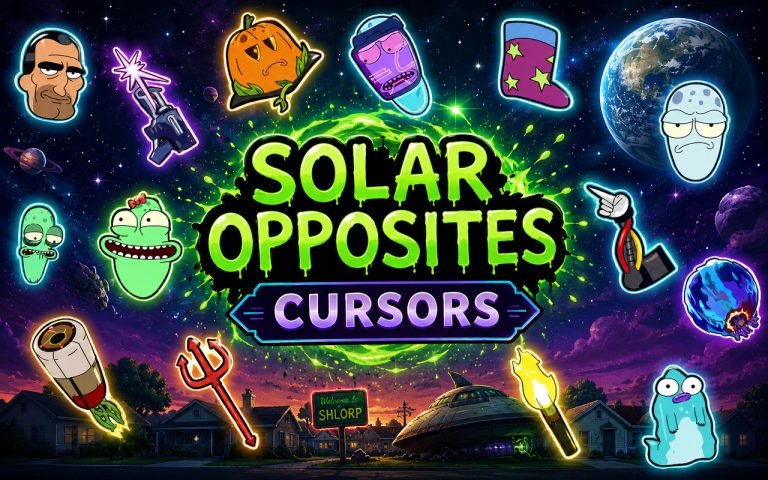
What Is The Solar Opposites Cursor?
The Solar Opposites Cursor is a Chrome extension that replaces your standard browser cursor with custom-designed cursors based on the animated series Solar Opposites. Each cursor is styled around the distinct characters and visual themes from the show, bringing a new look to everyday navigation. Installing the extension takes only a few seconds and the cursor activates immediately across your browser.
Solar Opposites is an adult animated science-fiction comedy created by Justin Roiland and Mike McMahan, following a group of aliens stranded on Earth who hold very different opinions about human life. The series features a memorable cast including Korvo, Terry, Yumyulack, Jesse, and The Pupa, each with a strongly defined visual identity. The show has built a devoted following thanks to its sharp humor, vibrant animation, and inventive storytelling.
This extension is a natural fit for fans who spend time browsing, streaming, or working online and want their desktop to reflect their enthusiasm for the series.
Key Features of The Solar Opposites Cursor Extension
Complete Solar Opposites Cursor Collection
The collection draws from the core cast and iconic elements of the show, featuring designs based on Korvo, Terry, Yumyulack, Jesse, and The Pupa alongside additional imagery pulled from the series. Fans of the show will recognize the characters and props rendered as functional cursor designs for everyday use.
- Korvo cursor design
- Terry cursor design
- Yumyulack cursor design
- Jesse cursor design
- The Pupa cursor design
- Solar Opposites alien theme cursor design
Original Animation Art Style
The cursors reflect the bold, flat color palette and clean outlines that define the Solar Opposites animation style. Character designs stay true to the show’s look, using the same vivid greens, purples, and blues that appear throughout the series. The thick linework and expressive character poses carry over well at cursor scale, making each design instantly recognizable. Fans familiar with the show will notice the attention paid to matching the source material.
Adjustable Cursor Size
A built-in size slider lets you scale each cursor up or down to suit your display and personal preference. Smaller sizes work well for compact laptop screens where precision matters, while larger sizes make the characters more visible on wide monitors or high-resolution displays. Finding the right scale takes only a few seconds using the slider in the extension panel.
Favorites System for Quick Switching
The favorites system lets you bookmark any cursor designs you return to regularly, so you can access them without scrolling through the full library each time. Saved favorites persist across browser sessions, meaning your preferred designs are ready each time you open Chrome. This is especially useful if you enjoy rotating between a few specific characters depending on your mood or task.
Lightweight and Performance-Friendly
The extension runs quietly in the background and places no measurable load on Chrome’s memory or processing resources. Page load times and browser responsiveness remain unaffected even during longer browsing sessions or on older machines. You can run the extension alongside other Chrome tools without any performance concerns.
Easy Toggle On and Off
A single click on the extension icon lets you switch the custom cursor off and revert to Chrome’s default cursor whenever needed, such as during video calls, work presentations, or web applications where a standard cursor is preferable. Re-enabling the extension is equally instant, and Chrome remembers which cursor design was last active so you pick up exactly where you left off.
How to Install The Solar Opposites Cursor
- Open Google Chrome on your desktop or laptop.
- Go to the Chrome Web Store and search for Solar Opposites Cursor.
- Click the extension listing to open its detail page.
- Click Add to Chrome and confirm when the popup appears.
- Click the extension icon in your Chrome toolbar to open the cursor library.
- Select any design to activate it immediately — no browser restart needed.
Why Solar Opposites Cursor Fans Love This Extension
Solar Opposites has earned a passionate fanbase that connects deeply with its characters, particularly the dynamic between the perpetually irritated Korvo and the cheerful, laid-back Terry. Yumyulack and Jesse bring their own distinct personalities to the show, and The Pupa has become one of the most talked-about elements of the series for its bizarre and compelling storyline. Having these characters present during everyday browsing is a small but satisfying way to stay connected to a show that fans genuinely care about. For viewers who have followed the series since its debut, seeing Korvo or Terry appear as a cursor carries a real sense of familiarity.
This extension resonates particularly with fans who spend long hours online, whether studying, working from home, or browsing between episodes of the show itself. A Solar Opposites fan who keeps Chrome open all day has a natural reason to want their browsing environment to reflect that interest without any extra effort.
Frequently Asked Questions
Does this extension work on all websites?
The cursor is active across virtually all websites you visit in Chrome. A small number of sites with strict content security policies may limit custom cursor behavior, but this is uncommon and the extension works normally on the vast majority of pages.
Can I use multiple Solar Opposites Cursor cursors at once?
Only one cursor can be active at a time, but switching between designs is quick. The favorites system lets you save your preferred characters and switch between them in seconds without scrolling through the entire collection.
Will this extension slow down my browser?
No. The Solar Opposites Cursor extension is built to be lightweight and runs quietly in the background. It has no noticeable impact on Chrome’s speed, memory usage, or page load performance.
Is the Solar Opposites Cursor extension free?
Yes. The extension is completely free to download and use from the Chrome Web Store. You get access to the full cursor library without any subscription or in-app purchases.