What Is The Night in the Woods Cursor?
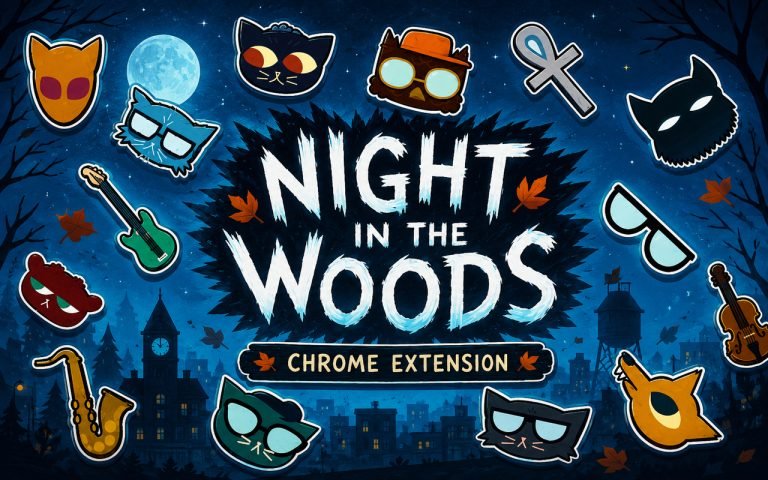
The Night in the Woods Cursor is a Chrome extension that replaces your standard browser pointer with custom cursor designs drawn from the beloved indie game Night in the Woods. Each cursor brings a character or visual element from Possum Springs directly into your browsing session, swapping out the default arrow for something far more personal. Installation takes seconds and the cursors activate immediately across Chrome tabs.
Night in the Woods is a narrative adventure game developed by Infinite Fall, set in the rundown town of Possum Springs and following Mae Borowski as she returns home after dropping out of college. The game is known for its richly written cast, including the energetic Gregg, the reserved Bea, and the gentle Angus, alongside a world full of autumnal atmosphere and emotional storytelling. Its hand-drawn art style and deeply human themes gave it a dedicated following that continues to grow years after its release.
This extension appeals to fans of the game who want a small but meaningful way to carry a piece of Possum Springs into their everyday online life, whether they are browsing, studying, or just scrolling through social media.
Key Features of The Night in the Woods Cursor Extension
Complete Night in the Woods Cursor Collection
The collection covers the core gang from Possum Springs, featuring Mae Borowski, Gregg, Bea, Angus, and several additional characters and visual motifs from the game’s world. Each cursor is crafted to reflect its subject’s personality, from Mae’s restless energy to Bea’s composed presence. The designs available include:
- Mae Borowski cursor
- Gregg cursor
- Bea cursor
- Angus cursor
- Gang member ensemble designs
- Possum Springs thematic motifs
Original Animation Art Style
Night in the Woods uses a distinctive flat, hand-drawn aesthetic built around warm autumn tones, deep midnight blues, and expressive character silhouettes. The cursors in this extension faithfully capture that visual identity, using the same earthy oranges, muted purples, and bold outlines that define the game’s look. Character proportions stay true to Infinite Fall’s original designs, keeping Mae and the rest of the gang immediately recognizable even at small cursor sizes. The result feels like a genuine extension of the game’s world rather than a generic fan adaptation.
Adjustable Cursor Size
The extension includes a size slider that lets you scale your cursor up or down to suit your screen resolution and personal preference. Whether you use a compact laptop display or a large external monitor, you can find a size that keeps the cursor visible and comfortable without overwhelming the page. Adjustments take effect instantly with no need to reload your browser.
Favorites System for Quick Switching
If you find yourself drawn to a particular character, the favorites system lets you bookmark that cursor for instant access on future visits. Rather than scrolling through the full library every time you open Chrome, your saved designs sit ready at the top of your panel. Favorites are stored persistently, so they remain available even after restarting your browser or your computer.
Lightweight and Performance-Friendly
The extension operates quietly in the background and places no measurable load on Chrome’s memory or processing. Page load times remain unaffected, and the extension causes no slowdowns even during sessions involving streaming, gaming, or other demanding browser tasks. It runs just as smoothly on older hardware as it does on newer machines.
Easy Toggle On and Off
A single click on the extension icon lets you switch the custom cursor off entirely, reverting Chrome to its default pointer whenever you need it for work, video calls, or any context where a custom cursor feels out of place. Switching back on is equally instant, and the extension remembers whichever cursor was last active so you never have to reselect it manually.
How to Install The Night in the Woods Cursor
- Open Google Chrome on your desktop or laptop.
- Go to the Chrome Web Store and search for Night in the Woods Cursor.
- Click the extension listing to open its detail page.
- Click Add to Chrome and confirm when the popup appears.
- Click the extension icon in your Chrome toolbar to open the cursor library.
- Select any design to activate it immediately — no browser restart needed.
Why Night in the Woods Cursor Fans Love This Extension
Night in the Woods resonated with players on a deeply personal level, telling a story about feeling lost, finding connection, and learning to live with uncertainty. Mae’s late-night conversations with Gregg, Bea, and Angus became touchstones for many players who saw their own lives reflected in Possum Springs. Having Mae or Gregg appear as your cursor is a quiet nod to that connection, a small reminder of a game that genuinely meant something. For a lot of fans, it is less about aesthetics and more about keeping that emotional world close during an ordinary day.
Students, remote workers, and creative professionals who spend long hours in Chrome will find these cursors a low-key but satisfying way to make their workspace feel more personal. Anyone who finished the game and still thinks about its ending will understand exactly why seeing Mae’s face on the pointer changes the mood of even a routine browsing session.
Frequently Asked Questions
Does this extension work on all websites?
The cursor is active across virtually all websites you visit in Chrome. A small number of sites with strict content security policies may limit custom cursor behavior, but this is uncommon and the extension works normally on the vast majority of pages.
Can I use multiple Night in the Woods Cursor cursors at once?
Only one cursor can be active at a time, but switching between designs is quick. The favorites system lets you save your preferred characters and switch between them in seconds without scrolling through the entire collection.
Will this extension slow down my browser?
No. The Night in the Woods Cursor extension is built to be lightweight and runs quietly in the background. It has no noticeable impact on Chrome’s speed, memory usage, or page load performance.
Is the Night in the Woods Cursor extension free?
Yes. The extension is completely free to download and use from the Chrome Web Store. You get access to the full cursor library without any subscription or in-app purchases.