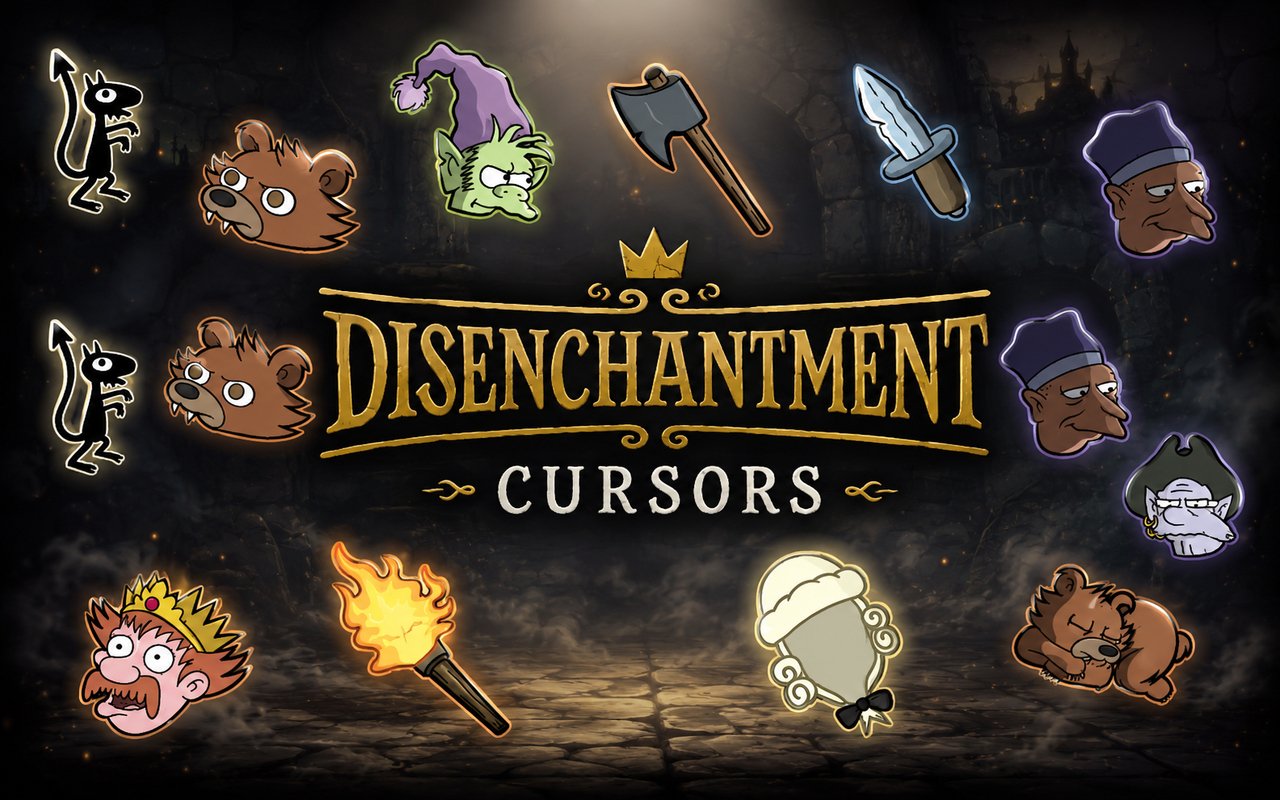
What Is The Disenchantment Cursor?
The Disenchantment Cursor is a Chrome extension that replaces your standard browser cursor with custom-designed cursors drawn from the world of Matt Groening’s animated fantasy series. Each cursor in the collection features artwork inspired directly by the show, bringing characters and visual elements from Dreamland into your everyday browsing experience. Installing the extension takes under a minute, and the new cursor becomes active immediately across your Chrome tabs.
Disenchantment is an adult animated series created by Matt Groening, best known for his work on The Simpsons and Futurama, and it follows Princess Bean, her demon companion Luci, and the naive elf Elfo through the chaotic medieval kingdom of Dreamland. The show also features memorable characters like the bumbling King Zog, the scheming Queen Dagmar, and a cast of fantastical creatures that populate the kingdom. Its dark humor and richly detailed fantasy setting have earned it a dedicated fanbase since its debut on Netflix.
This extension is a natural fit for fans of the series who spend time browsing, working, or studying and want a small, personal touch that reflects their enthusiasm for the show.
Key Features of The Disenchantment Cursor Extension
Complete Disenchantment Cursor Collection
The collection draws on the main cast and iconic imagery from across the series, including Luci, Elfo, Princess Bean, King Zog, Queen Dagmar, and visual elements tied to the kingdom of Dreamland itself. Each design captures a specific character or symbol in a way that is immediately recognizable to fans of the show:
- Luci the demon cursor
- Elfo the elf cursor
- Princess Bean cursor
- King Zog cursor
- Queen Dagmar cursor
- Dreamland fantasy symbol cursor
Original Animation Art Style
The cursors are rendered in a style consistent with the hand-drawn aesthetic that defines Disenchantment, featuring the flat, expressive character designs and muted fantasy color palette of the series. Characters are drawn with the same thick outlines and exaggerated proportions seen in the show, making each cursor feel like it was lifted directly from a frame of the animation. The earthy tones, shadowed environments, and medieval visual language of Dreamland carry through into every cursor design. This gives the collection a coherent look rather than a patchwork of mismatched styles.
Adjustable Cursor Size
A built-in size slider lets you scale each cursor up or down to suit your monitor size, screen resolution, or personal preference. Larger cursors work well on high-resolution or wide displays where a standard-sized cursor can feel easy to lose, while smaller sizes suit compact laptop screens or users who prefer a more subtle look. You can adjust the size at any time directly from the extension panel.
Favorites System for Quick Switching
The favorites system allows you to bookmark the cursor designs you return to most often, so you can access them instantly without scrolling through the full library each time. Saved favorites persist across browser sessions, meaning your preferred selections will still be waiting for you the next time you open Chrome. This is particularly useful if you like alternating between a few specific characters depending on your mood.
Lightweight and Performance-Friendly
The extension runs quietly in the background and places no measurable load on Chrome’s memory or processing resources. Page load times, tab performance, and browser responsiveness are unaffected, even during sessions involving video streaming, online gaming, or other resource-intensive tasks. It is equally reliable on older hardware as it is on modern machines.
Easy Toggle On and Off
A single click on the extension icon is all it takes to switch the custom cursor off and revert to your system default, which is useful during video calls, professional presentations, or when using web applications that have their own cursor behavior. Clicking again re-enables the extension instantly, and it remembers which cursor was last active so you never have to reselect your preferred design. No browser restart is required at any point.
How to Install The Disenchantment Cursor
- Open Google Chrome on your desktop or laptop.
- Go to the Chrome Web Store and search for Disenchantment Cursor.
- Click the extension listing to open its detail page.
- Click Add to Chrome and confirm when the popup appears.
- Click the extension icon in your Chrome toolbar to open the cursor library.
- Select any design to activate it immediately — no browser restart needed.
Why Disenchantment Cursor Fans Love This Extension
Disenchantment built a genuinely passionate audience through its blend of dark comedy, serialized storytelling, and characters that grow considerably more complex over multiple seasons. Fans who followed Bean’s journey from reluctant princess to active force in Dreamland’s fate, or who became attached to the odd dynamic between Luci’s cynicism and Elfo’s relentless optimism, tend to feel a strong connection to the show’s world and cast. Having Luci or Elfo as your browser cursor is a small but meaningful way to keep that connection present during the hours spent in front of a screen. For fans who were disappointed when the series concluded, it is also a quiet way to keep the world of Dreamland alive in daily life.
Students, remote workers, and creative professionals who spend long stretches browsing or researching often appreciate small personalization touches that make their workspace feel less generic. A Disenchantment fan who spends hours each day in Chrome will find the cursor extension adds character to an otherwise unremarkable part of the browsing experience without getting in the way of anything practical.
Frequently Asked Questions
Does this extension work on all websites?
The cursor is active across virtually all websites you visit in Chrome. A small number of sites with strict content security policies may limit custom cursor behavior, but this is uncommon and the extension works normally on the vast majority of pages.
Can I use multiple Disenchantment Cursor cursors at once?
Only one cursor can be active at a time, but switching between designs is quick. The favorites system lets you save your preferred characters and switch between them in seconds without scrolling through the entire collection.
Will this extension slow down my browser?
No. The Disenchantment Cursor extension is built to be lightweight and runs quietly in the background. It has no noticeable impact on Chrome’s speed, memory usage, or page load performance.
Is the Disenchantment Cursor extension free?
Yes. The extension is completely free to download and use from the Chrome Web Store. You get access to the full cursor library without any subscription or in-app purchases.




Community comments
Comments are reviewed before they appear publicly.