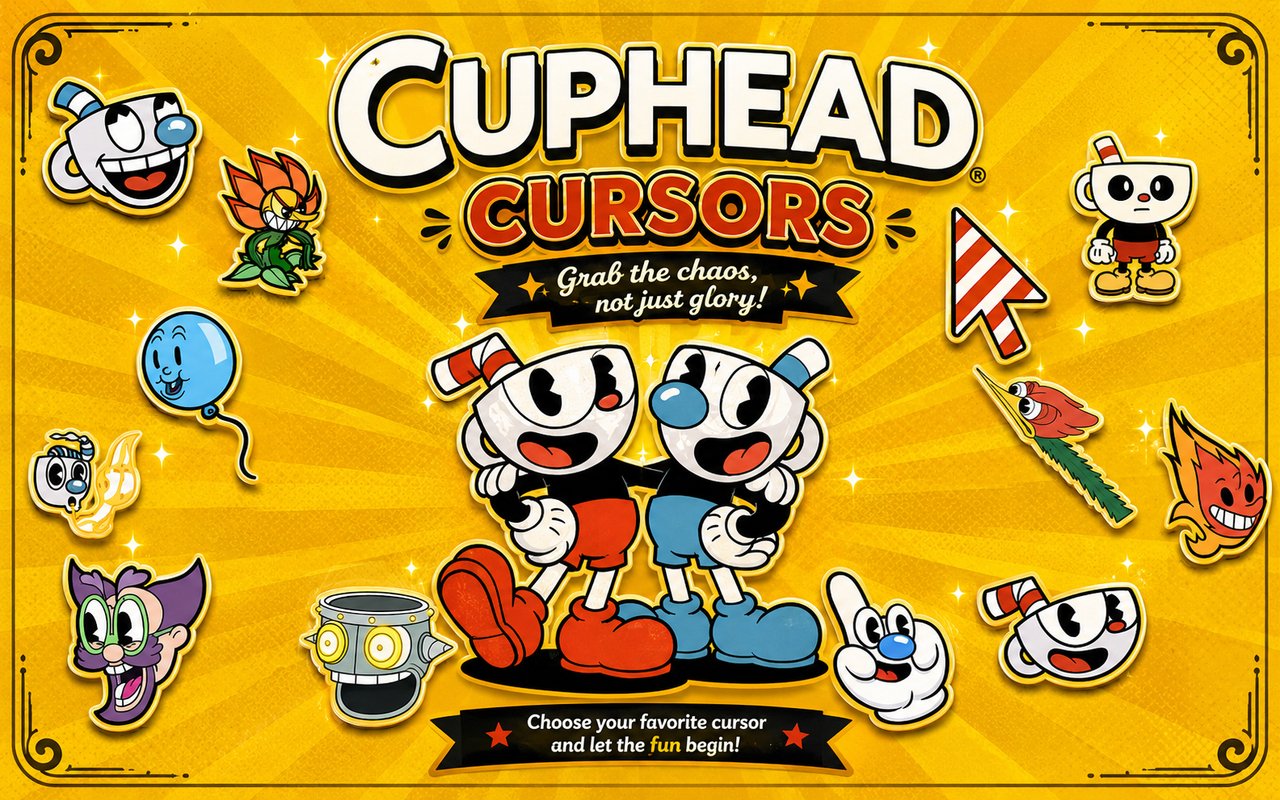
What Is The Cuphead Cursor?
The Cuphead Cursor extension replaces your standard Chrome browser cursor with hand-crafted designs inspired by the beloved Cuphead universe, including characters like Mugman, Cagney Carnation, and the Devil himself. Once installed, every click and hover on your browser reflects the iconic visual world of this celebrated franchise. The extension integrates seamlessly with Chrome, applying your chosen cursor across all tabs immediately.
Cuphead is a critically acclaimed run-and-gun video game developed by Studio MDHR, renowned for its hand-drawn 1930s cartoon animation style and gruelling boss battles. Players guide Cuphead and his brother Mugman through a series of deals and duels, facing memorable antagonists such as the Devil, King Dice, and Cagney Carnation, the menacing flower boss. The game’s striking visual identity and its Netflix animated series adaptation have made it one of the most recognisable indie properties of the past decade.
This extension is ideal for Cuphead fans who want to bring a touch of Inkwell Isle into their daily browsing without altering any browser settings beyond the cursor itself.
Key Features of The Cuphead Cursor Extension
Complete Cuphead and Mugman Cursor Collection
The collection draws from across the Cuphead roster, bringing characters and iconic imagery directly to your pointer. Designs feature Mugman, Cuphead, Cagney Carnation, the Devil, King Dice, Elder Kettle, Ms. Chalice, and the Soul Contract, among other recognisable elements from the game and series:
- Mugman cursor
- Cuphead cursor
- Cagney Carnation cursor
- The Devil cursor
- King Dice cursor
- Ms. Chalice cursor
- Soul Contract cursor
- Elder Kettle cursor
Original Animation Art Style
Every cursor in this collection is rendered in the rubberhose animation style that defines Cuphead’s visual identity, drawing from the hand-inked, watercolour-washed aesthetic of 1930s Fleischer Studios cartoons. Characters feature the bold black outlines, limited colour palettes of cream, red, black, and deep blue, and exaggerated expressive forms that make the game instantly recognisable. The cursor designs faithfully capture the thick linework and rounded, fluid movement of the original artwork. Whether you choose Mugman’s calm blue tones or the Devil’s fiery red silhouette, each design feels pulled directly from the game’s frames.
Adjustable Cursor Size
The extension includes a size slider that allows you to scale the cursor up or down to suit your display and personal preference. Smaller adjustments keep the cursor subtle on compact laptop screens, while larger settings make the detailed character artwork pop on high-resolution monitors. Finding the right size takes only a few seconds from within the extension panel.
Favorites System for Quick Switching
You can bookmark any cursor design as a favourite, saving it for fast retrieval without browsing the full collection each time you want to switch. The favorites system is particularly useful when you want to rotate between a handful of go-to designs across different moods or sessions. Your saved favourites persist across browser sessions, so your preferences are always waiting when you return.
Lightweight and Performance-Friendly
The extension operates quietly in the background without placing any measurable demand on Chrome’s memory or processing resources. Page load times remain unaffected, and the extension performs just as well during graphics-heavy browsing sessions or on older machines. You will not notice it running beyond the cursor itself.
Easy Toggle On and Off
A single click on the extension icon is all it takes to disable or re-enable the custom cursor. This makes it straightforward to switch back to your default system cursor for video calls, work applications, or any context where a themed cursor feels out of place. When you toggle it back on, the extension restores whichever design you had active last.
How to Install The Cuphead Cursor
- Open Google Chrome on your desktop or laptop.
- Go to the Chrome Web Store and search for Cuphead Cursor.
- Click the extension listing to open its detail page.
- Click Add to Chrome and confirm when the popup appears.
- Click the extension icon in your Chrome toolbar to open the cursor library.
- Select any design to activate it immediately — no browser restart needed.
Why Cuphead Cursor Fans Love This Extension
For fans who spent hours grinding through the Devil’s contract or cheering Mugman through Inkwell Isle’s punishing bosses, having these characters appear at the tip of the cursor brings a genuine sense of connection to the game. The bond players form with Cuphead and Mugman through shared struggle and triumph is part of what makes the franchise so enduring, and seeing Cagney Carnation or King Dice as part of your daily interface keeps that world alive outside of gameplay. The Netflix series has also introduced the characters to a new wave of fans who may not have played the game but feel equally attached to the roster and its distinctive look. This extension is a low-effort, high-impact way to keep that affection present throughout the day.
Gamers who stream, study, or spend long hours at their desks particularly appreciate having a cursor that reflects their interests without requiring any complex setup or system modification. Whether you are browsing between sessions, watching playthroughs, or simply doing everyday tasks, the Cuphead cursor adds a personal touch that anyone familiar with Inkwell Isle will immediately appreciate.
Frequently Asked Questions
Does this extension work on all websites?
The cursor is active across virtually all websites you visit in Chrome. A small number of sites with strict content security policies may limit custom cursor behavior, but this is uncommon and the extension works normally on the vast majority of pages.
Can I use multiple Cuphead Cursor cursors at once?
Only one cursor can be active at a time, but switching between designs is quick. The favorites system lets you save your preferred characters and switch between them in seconds without scrolling through the entire collection.
Will this extension slow down my browser?
No. The Cuphead Cursor extension is built to be lightweight and runs quietly in the background. It has no noticeable impact on Chrome’s speed, memory usage, or page load performance.
Is the Cuphead Cursor extension free?
Yes. The extension is completely free to download and use from the Chrome Web Store. You get access to the full cursor library without any subscription or in-app purchases.




Community comments
Comments are reviewed before they appear publicly.