Word limits are everywhere — essays, meta descriptions, tweets, cover letters, product descriptions, and academic abstracts all live and die by their length. The Sentence & Word Counter gives you every number that matters the instant you start typing: words, characters with and without spaces, sentences, paragraphs, and an estimated reading time. There’s no button to press and nothing to upload — the counts update live as you write or paste. It’s built for students hitting an exact word count, writers trimming to a limit, and anyone who needs to know at a glance whether their text fits. Because everything runs in your browser, your writing stays private and never leaves your device.
Sentence & Word Counter
Live counts of words, characters, sentences, and reading time.
How to use the Sentence & Word Counter
- Type or paste your text into the box. Counts begin updating from the very first character.
- Watch the live stats. Words, characters, characters without spaces, sentences, paragraphs, and reading time all refresh as you edit.
- Edit in place. Add or cut text and every number adjusts instantly, so you can trim precisely to a target.
- Clear when done with the Clear button to start fresh — nothing is saved between sessions.
What counts as a word?
It sounds like a trivial question, but it is the reason two word counters can disagree about the same document. There is no single universal definition, so every tool has to pick a rule and apply it consistently.
This counter uses the standard, widely-shared convention: a word is any run of characters separated by whitespace. Spaces, tabs and line breaks are the dividers; everything between them counts as one word. That rule is simple, predictable, and matches what Microsoft Word, Google Docs and most academic submission systems do, which is exactly what you want when a marker is checking your total against a limit.
The consequences are worth knowing, because they explain nearly every “why does it say that?” moment:
| Text | Counted as | Why |
|---|---|---|
| well-known | 1 word | The hyphen is not whitespace |
| state of the art | 4 words | Spaces divide it, even though it is one concept |
| 2026 | 1 word | Numbers are tokens like any other |
| $1,250.00 | 1 word | No internal whitespace |
| e.g. | 1 word | Abbreviation with no spaces |
| don’t | 1 word | Apostrophes do not split tokens |
| — (a dash alone) | 1 word | Any non-whitespace run counts |
If your institution counts differently — some exclude the reference list, footnotes, or quotations from the total — count those sections separately and subtract. The tool gives you an accurate figure for whatever text you paste into it, so isolating a section is the reliable way to match an unusual rule.
Which formulas does this word counter use?
Every metric on this page comes from a short, transparent rule. Nothing is estimated except the reading time, and even that is a plain division.
| Metric | How it is calculated | Exact or estimate? |
|---|---|---|
| Words | Split the text on runs of whitespace; count the non-empty pieces | Exact |
| Characters | Total length of the text, including spaces, punctuation and line breaks | Exact |
| Characters (no spaces) | Total length after removing all whitespace | Exact |
| Sentences | Count runs of text terminated by ., ! or ?, plus any trailing unpunctuated text |
Near-exact |
| Paragraphs | Count blocks separated by one or more line breaks | Exact |
| Reading time | words ÷ 200, rounded up to the nearest minute |
Estimate |
Why sentence counting is “near-exact”
Sentence detection is the one metric that cannot be perfect without understanding meaning. A full stop usually ends a sentence — but not in Dr. Smith, e.g., 3.14, or U.S.A. Terminal-punctuation counting is the standard approach and is accurate for ordinary prose, but a paragraph dense with abbreviations or decimals will read slightly high. If the sentence figure looks off, abbreviations are almost always the reason. Words and characters are unaffected by this and remain exact.
The reading-time formula
Reading time is word count ÷ 200, rounded up. Two hundred words per minute is the standard planning figure for silent reading of general prose by an adult; published estimates for average adult reading speed cluster in the 200–250 range, with technical material slower and light fiction faster. The compiled research summarised under words per minute gives a good sense of the spread. Treat the output as a planning number, not a stopwatch.
Example word count, step by step
Take this sentence pair: “The quick brown fox jumps over the lazy dog. It barked twice!”
- Words. Split on spaces: The, quick, brown, fox, jumps, over, the, lazy, dog., It, barked, twice! — that is 12 words. Note that dog. and twice! each count as one word; punctuation rides along with the token.
- Characters. Count every character including the two sentence-ending marks and all 11 spaces: 61 characters.
- Characters without spaces. Remove the 11 spaces: 50 characters.
- Sentences. Two runs end in terminal punctuation (
.and!): 2 sentences. - Paragraphs. No line breaks, so 1 paragraph.
- Reading time.
12 ÷ 200 = 0.06minutes, which rounds up to 1 minute — the minimum the tool displays.
A few more reference counts you can verify by hand:
| Sample text | Words | Sentences | Characters | No spaces |
|---|---|---|---|---|
| “Hello world.” | 2 | 1 | 12 | 11 |
| “This is a test! Two sentences here?” | 7 | 2 | 35 | 29 |
| “The quick brown fox jumps over the lazy dog. It barked twice!” | 12 | 2 | 61 | 50 |
| A 150-word meta description draft | 150 | ~8 | ~900 | ~750 |
Words or characters: which limit applies where
The single most common mistake in writing to a limit is counting the wrong thing. Some formats cap words; most online platforms cap characters. A 40-word sentence of short words can be well under a character limit that a 20-word sentence of long words blows past. Here are the limits people hit most often:
| Where | Typical limit | Counted in |
|---|---|---|
| SEO page title | ~60 | Characters |
| SEO meta description | ~160 | Characters |
| X / Twitter post | 280 | Characters |
| SMS message | 160 | Characters (before it splits) |
| LinkedIn headline | 220 | Characters |
| YouTube video title | 100 | Characters |
| Instagram caption | 2,200 | Characters |
| Academic abstract | 150–250 | Words |
| University essay | 1,500–3,000 | Words |
| UCAS / personal statement | ~4,000 | Characters |
| Cover letter | 250–400 | Words |
| Blog post (typical) | 1,000–2,000 | Words |
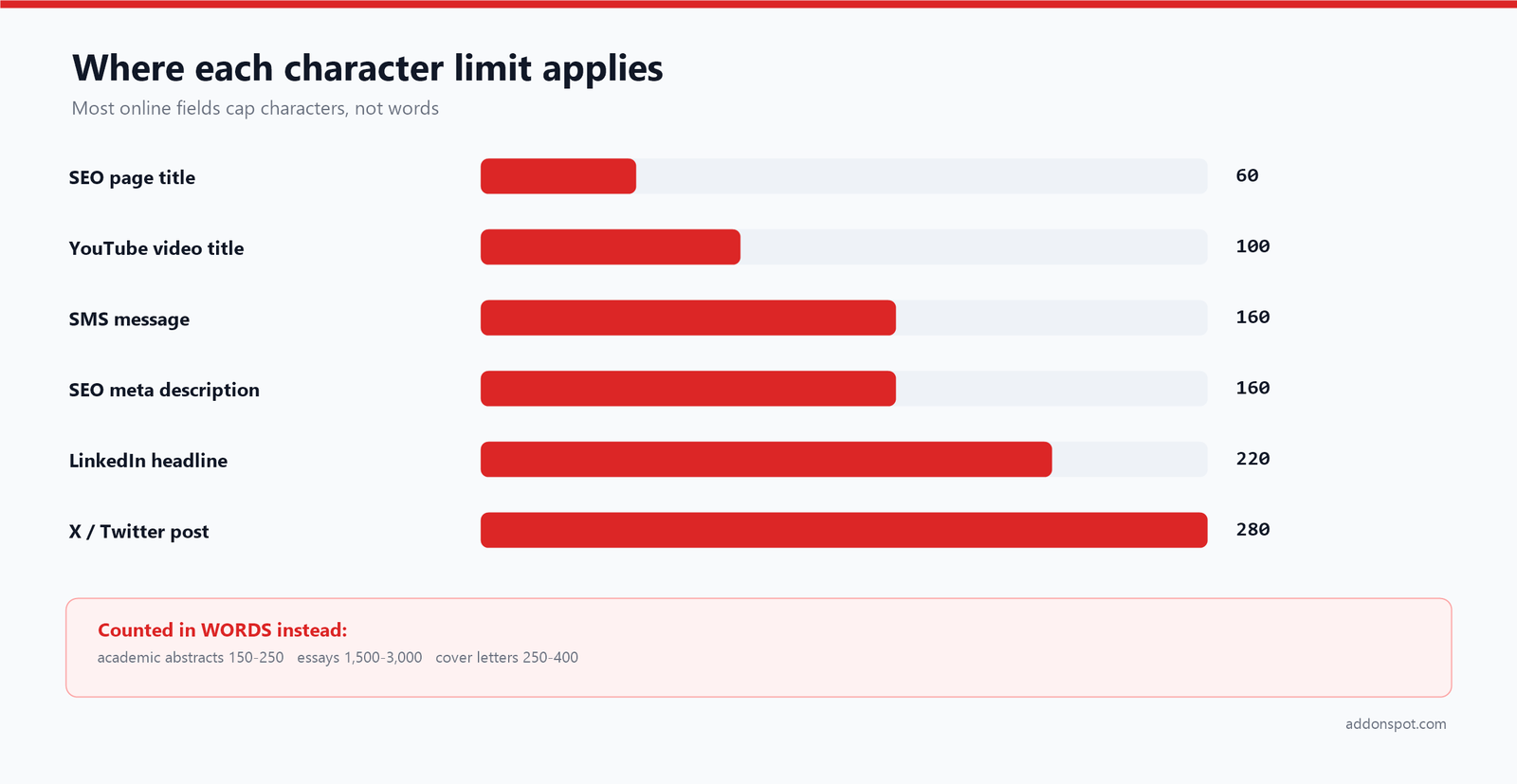
When the field counts characters, keep an eye on the “characters” and “no spaces” figures rather than words. When it counts words — most academic work — the word total is your guide, but reading time and sentence count still help you judge pace.
Why SMS splits at 160 characters
The 160-character SMS limit is not arbitrary: it comes from the 7-bit character encoding defined in the GSM 03.38 standard, which packs 160 seven-bit characters into a 140-byte message. Use a character outside that basic set — an emoji, a curly quote, an accented letter — and the whole message switches to 16-bit encoding, dropping the limit to 70 characters. That is why a message that looks short can suddenly bill as three. Checking the character count before sending a campaign is the cheapest possible optimisation.
Search snippet limits are measured in pixels, not characters
The familiar “60 characters for a title, 160 for a description” guidance is a useful approximation, but search engines actually truncate based on rendered width. A title of sixty narrow characters may display in full while sixty wide ones get cut. Google’s own documentation on title links and snippets deliberately avoids naming a fixed number and instead advises writing descriptive, non-truncated text. The practical method: use the character count here as your guardrail, front-load the important words, and make sure the entry still makes sense if the tail is cut.
How to count words in Word, Google Docs and Excel
For a document you already have open, the built-in counters are the fastest route — and knowing where they differ from this tool saves arguments later.
| Application | How to get the count | Notes |
|---|---|---|
| Microsoft Word | Status bar at the bottom, or Review → Word Count | Select text first to count only that selection |
| Google Docs | Tools → Word count, or Ctrl+Shift+C | Tick “display word count while typing” for a live total |
| Google Sheets / Excel | =LEN(A1) for characters |
Counts every character including spaces |
| Google Sheets / Excel | =LEN(A1)-LEN(SUBSTITUTE(A1," ",""))+1 for words |
Counts spaces and adds one; returns 1 for an empty cell |
| Google Sheets / Excel | =LEN(SUBSTITUTE(A1," ","")) for characters without spaces |
Mirrors the “no spaces” figure here |
Microsoft’s guide to showing the word count covers the selection and status-bar options in detail. Two differences to watch for: Word includes text inside footnotes and text boxes only if you ask it to, and it counts headings and captions in the main total — which is why a document that reads as 1,950 words can report 2,080. Pasting only the body text into the counter on this page is the quickest way to get a clean figure for the part that is actually being marked.
Sentence length, readability and why the sentence count matters
The sentence and paragraph figures are not filler metrics — they are the raw ingredients of readability. Divide your word count by your sentence count and you get average sentence length, one of the two variables in almost every readability formula.
As a rough guide: an average of 15–20 words per sentence reads comfortably for a general audience. Push past 25 and comprehension starts to drop, particularly on screens. Drop below 10 and the prose can feel choppy and abrupt. The Flesch–Kincaid readability tests combine average sentence length with average syllables per word to produce a grade level, and most style guides for public-facing writing target somewhere around grade 8–10.
You can use this page for a quick readability sanity check without any extra tooling. Paste a draft, divide words by sentences, and if the average is climbing above 25, look for the longest sentence and split it. The paragraph count does similar work at a larger scale: a 1,200-word article in four paragraphs is a wall of text regardless of how good the sentences are.
Writing to a word count without padding
A strict word count cuts both ways: sometimes you are over, sometimes short. Both are best solved by editing for quality, not by stuffing or slashing at random.
If you are over, paste the draft here, watch the total, and cut the weakest sentence first. Trimming for length almost always improves clarity as a side effect — redundant phrases, hedging words, and throat-clearing intros are usually the first to go. Look especially for in order to (use to), due to the fact that (use because), and any sentence that restates the previous one.
If you are short, resist padding with filler, which readers and markers spot instantly. Add substance instead: an example, a counter-argument, a concrete detail, a limitation of your own argument. The counter keeps you honest in both directions without breaking your writing flow.
Most institutions allow a tolerance of around 10% either side of a stated limit, but this varies and some enforce a hard cap with penalties. Check the specific rule before relying on the margin, and when in doubt aim to land just under the stated figure.
Trimming checklist
When you need to lose 10% quickly, work down this list in order — it removes words without removing meaning:
- Cut the throat-clearing opener. Sentences beginning “It is important to note that” or “In today’s world” almost always start better at the third clause.
- Replace phrases with words. In order to → to; due to the fact that → because; at this point in time → now.
- Delete intensifiers. Very, really, quite, actually and basically rarely survive a careful read.
- Merge duplicate sentences. If two sentences make one point, keep the sharper one.
- Convert a list into a sentence (or the reverse) — whichever is shorter for your content.
Paste the result back in and watch the total drop. Because the count is live, you can see the effect of each cut immediately rather than guessing.
Common length targets worth knowing
A few limits come up again and again. Search-engine meta descriptions are best kept under roughly 160 characters so they don’t get truncated in results. Many academic abstracts cap at 150 to 250 words — the APA Style abstract guidance is a good reference for what belongs inside that budget. A standard reading pace of about 200–250 words per minute is a reliable rule of thumb, though it varies by reader and material. When you’re writing to a strict count, paste your draft here, watch the word total, and cut the weakest sentence first.
Reading time versus speaking time
The reading-time estimate assumes silent reading at around 200 words per minute, which is right for blog posts, articles, and anything read on a screen. If you are writing something to be spoken — a speech, a video script, a podcast segment — plan for a slower pace. Most people speak at roughly 130 to 150 words per minute when presenting clearly, so a script reads aloud in noticeably more time than the silent estimate suggests.
| Talk length | Words at 130 wpm | Words at 150 wpm |
|---|---|---|
| 1 minute | ~130 | ~150 |
| 3 minutes | ~390 | ~450 |
| 5 minutes | ~650 | ~750 |
| 10 minutes | ~1,300 | ~1,500 |
| 20 minutes | ~2,600 | ~3,000 |
A practical rule: budget about a minute for every 130 words rather than 200. A five-minute talk is therefore around 650 spoken words, not 1,000. Watching the live word total as you draft keeps a speech from overrunning its slot — and if you are timing a video script, build in a little extra for pauses, which the raw word count cannot see.
Why use this word counter
- Truly live results. No “count” button and no page reload — the numbers keep pace with your typing, which makes hitting an exact limit painless.
- Six metrics, not one. Character counts (with and without spaces) matter for meta tags and social posts, while sentence and paragraph counts help with readability and structure.
- Reading-time estimate. Based on an average pace of around 200 words per minute, it tells you roughly how long your piece takes to read — useful for scripts, speeches, and blog intros.
- Nothing to install. No add-in, no extension, no account — it works the same on a phone, a locked-down school laptop, or a borrowed machine.
- Completely private. Your text is processed locally and never transmitted or stored, so it’s safe for drafts, confidential notes, and unpublished work. Our privacy policy spells out what that means.
Frequently asked questions
What formula does this word counter use?
What counts as a word?
How does the tool count a sentence?
Why does my word count differ from Microsoft Word?
Is my text uploaded or stored anywhere?
What’s the difference between characters and characters without spaces?
Does a word count include numbers and hyphenated words?
How many words is a 5 minute speech?
How is reading time calculated?
How do I count characters in Excel or Google Sheets?
Does it work on my phone?
Is the word counter free?
Related tools and further reading
- Anagram Maker — play with the letters in your text.
- Age Calculator — another quick, private browser calculator with exact, formula-based results.
- Brand Name Generator — craft names, then check tagline length here.
- Book Title Generator — find a title, then test it against a 60-character limit.
- TikTok Name Generator — handles that fit platform character caps.
- Gamertag Generator — build a handle, then check it against a length limit.
- Clan Name Generator — short team names that survive truncation.
Related reading: our guide to picking a gamertag that isn’t already taken covers the character-limit traps on gaming platforms, and the band-naming framework works through the same “say it in five words” discipline this counter enforces. You can browse everything in the username and handle generators and brand and book name generators collections.
This tool is part of our Text Tools & Calculators collection, one of several free tool sets on AddonSpot. Writing a bio or blurb to a strict limit? Our brand name checklist pairs well when you’re finalizing copy, and there are more writing and naming guides on the guides and blog. If something here doesn’t behave as you expect, the FAQ covers the common cases and you can always get in touch.