A username is the first thing anyone reads on TikTok, and it works harder than most people expect. It sits above every video, gets typed into search, and becomes the handle people share when they recommend you. The TikTok Name Generator takes a single keyword — your name, your niche, or a mood you want to project — and spins out dozens of handle ideas you can actually use. It’s built for creators starting a fresh account, anyone whose ideal name is already taken, and people who simply freeze up when a signup form asks them to invent something clever on the spot. Type a word, pick a style, and generate as many options as you like until one clicks. Keep in mind that username availability shifts constantly, so always double-check your final pick directly in your TikTok settings before you lock it in.
TikTok Name Generator
Turn a keyword into catchy, available-looking @handles.
How to use the TikTok Name Generator
- Enter a keyword. Use your first name, your content topic (baking, fitness, gaming), or a vibe word like “luna” or “aura.”
- Choose a style. Aesthetic leans soft and dreamy, Playful is casual and fun, Professional suits brands and educators, and Mixed blends all three.
- Pick how many ideas you want — 10 for a quick look, 30 when you want a wide shortlist.
- Press Generate. A grid of @handles appears instantly, each with its own Copy button.
- Shortlist and verify. Copy your favorites, then check each one directly in the TikTok app before you commit.
How does this TikTok Username Generator work?
The generator is not pulling words out of a hat. It builds each handle from your keyword using a small set of well-defined construction patterns, then filters the output so what you see is usable rather than random.
The construction patterns
| Pattern | How it builds the name | Example from “luna” |
|---|---|---|
| Prefix | Adds a descriptive word before your keyword | @softluna, @dailyluna |
| Suffix | Adds a role, place or collective word after it | @lunahq, @lunazone |
| Wrap | Combines a prefix and a suffix together | @thelunaclub |
| Separator | Inserts a period or underscore to open the name up | @luna.era, @luna_tv |
| Blend | Fuses your keyword with a mood word | @lunaglow, @auraxluna |
The style filter
Your chosen style decides which vocabulary pool the prefixes and suffixes are drawn from. Aesthetic pulls soft, atmospheric words (soft, moon, glow, era, aura). Playful reaches for casual, upbeat ones (oh, lil, daily, club, zone). Professional uses credibility words (hq, co, labs, official, real). Mixed samples from all three, which is the right choice when you are still exploring.
Why the output tends to be available
A bare one-word handle like @luna was claimed years ago. By combining your keyword with a second element, the generator produces two-part names whose combined form is far less likely to be taken — while still reading as a deliberate choice rather than a fallback. It also skips number-padding by default, because @luna9523 signals “my real name was taken” to anyone who reads it.
Everything runs locally in your browser. Your keyword is never uploaded, nothing is stored, and there is no signup or generation limit — see our privacy policy for specifics.
Why Use Our TikTok Name Generator?
- It breaks creative block fast. Staring at an empty username field is the hardest part. Seeing 20 concrete options reframes the task from “invent something” to “choose something,” which your brain finds far easier.
- It builds names around your keyword. Every result is anchored to the word you typed, so the suggestions stay relevant to who you are instead of being random noise.
- It nudges toward available handles. By combining prefixes, suffixes, and light separators, the tool produces variations that are far more likely to be free than a plain one-word name.
- It respects TikTok’s actual rules. Results stay within the 24-character limit and use only letters, numbers, periods and underscores, so you will not fall in love with a handle the app then rejects.
- Four styles, one keyword. The same input generates a soft aesthetic handle, a playful one, and a professional one, which is genuinely useful when you have not settled on a brand voice yet.
- It runs entirely in your browser. Nothing is uploaded, no account is needed, and you can regenerate endlessly without hitting a limit.
TikTok username rules to know before you commit
It is worth knowing the constraints before you get attached to an idea. These are TikTok’s own rules, taken from its support documentation on changing your username:
| Rule | Detail |
|---|---|
| Length | 2 to 24 characters |
| Allowed characters | Letters, numbers, underscores (_) and periods (.) |
| Not allowed | Spaces, emoji, hyphens, and other symbols |
| Period placement | A username cannot end with a period |
| Uniqueness | Must not already be taken — including by suspended or deactivated accounts |
| Change frequency | Once every 30 days |
| Side effect | Changing your username also changes your profile link |
| Releasing a handle | After giving one up, you cannot immediately reclaim it |
Username vs display name — they are not the same thing
This trips up a lot of new creators. Your username is the unique @handle in your profile URL. Your display name (sometimes called your nickname) is the larger text shown on your profile, and it plays by much looser rules.
| Username (@handle) | Display name | |
|---|---|---|
| Max length | 24 characters | 30 characters |
| Must be unique? | Yes | No |
| Spaces & symbols | No | Yes, including emoji |
| Change limit | Once every 30 days | Once every 7 days |
| Appears in your URL | Yes | No |
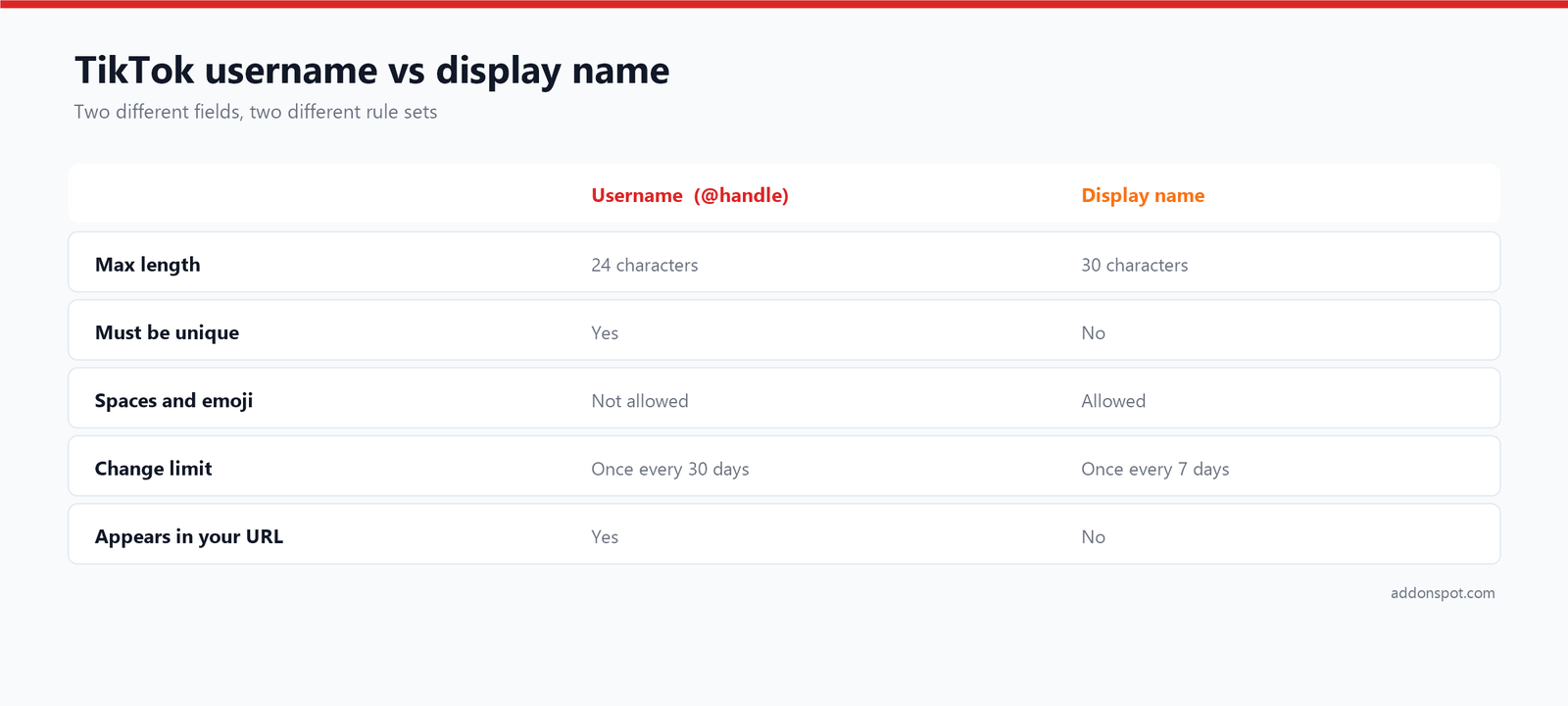
The practical move: put your searchable keyword in the display name, where you have spaces and no uniqueness contest, and keep the username short and clean. A baker might run @sarahbakes as the handle with “Sarah | Easy Baking Recipes” as the display name. That combination covers both discovery and memorability.
How to Change Your TikTok Username?
Changing your handle takes under a minute, but the 30-day lock means it is worth getting right on the first attempt.
- Open TikTok and tap Profile in the bottom-right corner.
- Tap Edit profile, just under your profile photo.
- Tap Username. Your current handle appears in an editable field.
- Type the new username. TikTok checks availability as you type and flags anything already taken or containing an invalid character.
- Tap Save. Confirm when the app warns you that the change affects your profile link.
On desktop, the same option lives under Settings → Manage account → Username.
Why the Save button might be greyed out
- You changed it within the last 30 days. This is the most common cause by far. The counter starts from your last successful change, and there is no way to shorten it — you simply have to wait.
- The handle is taken. Including by accounts that are suspended, deactivated or dormant. Those handles are not released on any published schedule.
- You used an invalid character. Spaces, hyphens and emoji are rejected outright.
- It ends with a period. Allowed inside the name, never at the end.
- You are over 24 characters. The field usually stops accepting input rather than warning you.
What happens to your existing followers
Your followers, videos, likes and comments all stay exactly as they are — a username change does not reset your account. What does break is every existing link to your old profile URL, because the URL contains your handle. Anyone who bookmarked you, and every “link in bio” pointing at your old address, will hit a dead end. If you have an audience worth keeping, post about the change before and after you make it, and update the link on your other platforms the same day.
Best practices for choosing a TikTok name
The rules tell you what is possible. These principles decide whether a handle actually works for you over the next few years.
Make it easy to say out loud
The single best test: say your handle to a friend, wait an hour, and ask them to type it. Word-of-mouth and duets are how handles spread, and anything requiring “that’s with two underscores and a zero instead of an O” loses people at the first retelling.
Keep it short
You have 24 characters, but you should rarely use them. Short handles are easier to remember, easier to tag in a comment, and they display in full without truncation on smaller screens. Aim for something in the range of 6 to 15 characters.
Go easy on numbers and separators
A single well-placed period or underscore can make a long name readable. Stacking them makes a handle harder to type and much easier to mistype — which sends people to someone else’s profile. If you must use numbers, give them meaning (a year you care about, a lucky number) rather than tacking on a random string.
Signal your niche, but do not trap yourself
@sarahbakes tells a new visitor what they are getting, which helps conversion. But a name that is too specific can box you in later — @sourdoughonly is awkward once you branch into cakes. Aim for a name broad enough to survive one pivot.
Think about how it ages
Handles tied to a trend, a year or a single game date badly. A name that felt current in 2024 reads as abandoned in 2027. Choose something that describes you rather than the moment.
Claim the same handle everywhere
Cross-platform consistency compounds. Before committing on TikTok, check the same name on Instagram, YouTube and X. It is far better to take your second-choice name on all four than your first choice on one. If your handle is also becoming a business, run it through our brand name checklist and confirm the domain is free before you build anything on it.
Read it for accidental words
Run the letters together and read them fresh, without the mental spacing you have as the author. Plenty of well-intentioned handles hide an unfortunate word across the join — this is a two-second check that saves real embarrassment.
Example handle ideas
Here’s the kind of output you can expect from a few different keywords and styles:
| Keyword | Style | Sample handles |
|---|---|---|
| baking | Playful | @dailybakingclub, @ohbakingzone, @lilbaking |
| luna | Aesthetic | @softlunadiaries, @lunaglow, @moonluna.era |
| fitness | Professional | @getfitnesshq, @realfitnessco, @meetfitnesslabs |
| pixel | Mixed | @pixel_tv, @thepixelsquad, @auraxpixel |
How to get the most out of the aesthetic styles
When you switch the generator to Aesthetic, you are not getting random word soup — you are getting names formatted with a particular visual convention in mind. Here is how to squeeze the most value out of it.
- Lowercase is the whole vibe. Notice how most creators in this space write their handle entirely in lowercase. It reads cleaner and more relaxed, and TikTok handles are not case-sensitive anyway.
- Soft separators do real work. A period or underscore in the right spot turns a long compound into something that feels spaced out and deliberate: @moonluna.era reads far better than @moonlunaera.
- Short and punchy wins. Two-syllable combinations feel like genuinely original handles rather than descriptions.
- Save the decoration for your display name. Stylised fonts, symbols and emoji cannot go in a username — TikTok rejects them. Your display name accepts all of it, so that is where a decorative look belongs.
Matching a handle to your niche
Different corners of TikTok have genuinely different naming conventions, and matching yours signals that you belong there:
- Soft / cozy accounts lean on words like honey, peach, cloud, bun and dawn — warm and approachable, ideal for pet accounts and cozy vlogs.
- Alternative and darker aesthetics reach for shadow, raven, echo, ash and static.
- Gaming accounts favour sharp, consonant-heavy words and clan-style tags — our Clan Name Generator and Gamertag Generator are built for exactly that register.
- Educational and business accounts do better with plain credibility markers: hq, co, official, or simply your real name.
Before you commit: a final checklist
- Check availability on TikTok itself — the generator cannot see live availability, and only the app knows for certain.
- Check the same handle on Instagram, YouTube and X before deciding.
- Say it out loud and have someone else spell it back to you.
- Count the characters — 24 is the hard ceiling. Our Sentence & Word Counter checks this instantly, and is handy for trimming your bio too.
- Confirm it contains only letters, numbers, periods and underscores, and does not end in a period.
- Read it as one run-on word to catch anything unintended.
- Sleep on it. The 30-day lock makes this the rare online decision worth a night’s thought.
Frequently asked questions
How do I change my TikTok username?
How often can I change my TikTok username?
What is the TikTok username character limit?
Why can’t I change my TikTok username?
What is the difference between a TikTok username and a display name?
Will I lose followers if I change my username?
Are the generated TikTok names guaranteed to be available?
How do I check if a TikTok username is taken?
What makes a good TikTok name?
Can I use emoji or spaces in my TikTok username?
Does the tool store the keyword I enter?
Is it really free?
Related tools and further reading
- Gamertag Generator — for gaming profiles and consoles.
- Clan Name Generator — name a squad, guild or team.
- Brand Name Generator — if your account is really a business.
- Book Title Generator — for creators publishing alongside their channel.
- Sentence & Word Counter — check your handle against the 24-character limit and trim your bio.
- Anagram Maker — rearrange your own name into something unexpected.
Browse the full username and handle generators collection, or the rest of the free tools on AddonSpot. New to building a handle from scratch? Our guide on naming your band covers a framework that works just as well for a creator alias, and picking a gamertag that isn’t already taken tackles the availability problem head-on. More write-ups live on the guides and blog, common questions are answered in the FAQ, and you can always suggest a tool you would like us to build.