“How old is that, exactly?” is a surprisingly fiddly question once you go past whole years. Months have different lengths, leap years shift the math, and counting on your fingers from a birth date to today is easy to get wrong. The Age Calculator does it precisely: enter a date of birth and it returns the exact age in years, months, and days, plus totals in months, weeks, days, and hours. Leave the second field blank to measure to today, or set it to any date to find an age at a past or future moment. It’s handy for filling in forms, working out eligibility, planning milestones and anniversaries, or just settling the question of exactly how many days you’ve been around.
Age Calculator
Find an exact age in years, months, and days from a birth date.
How to use the Age Calculator
- Enter the date of birth in the first field.
- Optionally set a second date. Leave it blank to calculate age as of today, or pick any date to measure the age at that point.
- Press Calculate (or just change a date) to see the result update instantly.
- Read the breakdown. The top shows years, months, and days; below it you get total months, weeks, days, and hours.
What is chronological age?
Chronological age is simply the amount of time that has passed since the moment you were born, measured against the calendar. It is the number you write on a passport application, the number a school uses to decide which year group you join, and the number a doctor records at the top of your chart. Nothing about your health, fitness, or lifestyle changes it — it advances at exactly one day per day for everyone, without exception.
Because it is purely a calendar measurement, chronological age is the only age that can be calculated with total certainty from two pieces of information: a date of birth and a reference date. That is precisely what this calculator does. Everything else people call “age” — mental age, fitness age, metabolic age — is an estimate produced by a model. Chronological age is a fact produced by subtraction.
Two details are worth pinning down. First, chronological age counts completed time, not time in progress. Someone who is eleven months old is still “zero years old” in the international system, and someone three days short of their fortieth birthday is still thirty-nine. Second, chronological age is measured against a specific calendar. This tool uses the Gregorian calendar, the civil standard almost everywhere in the world, and expects dates in the unambiguous order used by the ISO 8601 date standard so there is never confusion between day-month and month-day ordering.
What is the difference between chronological age and biological age?
Chronological age tells you how long you have existed. Biological age attempts to tell you how worn the body actually is — how closely your physiology resembles the typical physiology of people at a given chronological age. The two often disagree, and that disagreement is exactly why the concept exists. A sedentary smoker of forty may have the cardiovascular profile of a typical fifty-five-year-old; a lifelong athlete of sixty may test like a typical forty-five-year-old.
| Chronological age | Biological age | |
|---|---|---|
| What it measures | Elapsed calendar time since birth | Estimated physiological condition of the body |
| How it is obtained | Date subtraction — exact | Biomarker models — an estimate |
| Can it be changed? | No | Potentially, via health and lifestyle |
| Does everyone agree on it? | Yes, given a date of birth | No — different models give different answers |
| Used for | Legal documents, eligibility, records | Health research, risk assessment, wellness |
Biological age is estimated from measurable markers: blood pressure, inflammatory markers, lung function, grip strength, cholesterol panels, and increasingly from DNA methylation patterns read by an epigenetic clock. Because every model weighs those markers differently, two biological-age tests on the same person on the same day can easily disagree by several years. The World Health Organization’s overview of ageing and health and the US National Institute on Aging’s summary of what we know about healthy aging both make the same point: the science is real but still developing, and the numbers should be read as indicators rather than verdicts.
The practical takeaway: use chronological age whenever a number has to be correct and defensible — forms, eligibility, legal thresholds, medical records. Treat biological age as a health conversation starter, never as a substitute. This calculator deals strictly in chronological age, which is why its output is exact rather than approximate.
Which formula does this age calculator use?
The calculator does not divide the elapsed time by 365.25 and round, which is the shortcut that produces most wrong answers. It uses calendar-aware borrowing subtraction, unit by unit, from smallest to largest. Written out, the formula is:
| Step | Formula | If the result is negative |
|---|---|---|
| 1. Days | D = day(target) − day(birth) |
Add the number of days in the month immediately before the target month, then carry 1 from the months column. |
| 2. Months | M = month(target) − month(birth) − carry |
Add 12, then carry 1 from the years column. |
| 3. Years | Y = year(target) − year(birth) − carry |
The two dates are in the wrong order — swap them. |
The totals shown underneath come from a separate and much simpler calculation. Total days is the raw difference between the two dates as absolute calendar days; weeks, hours, and the rest are derived from it:
Total days = target date − birth date(counted in real calendar days, leap days included)Total weeks = Total days ÷ 7Total hours = Total days × 24Total months ≈ Total days ÷ 30.44(the average month length across a four-year cycle)
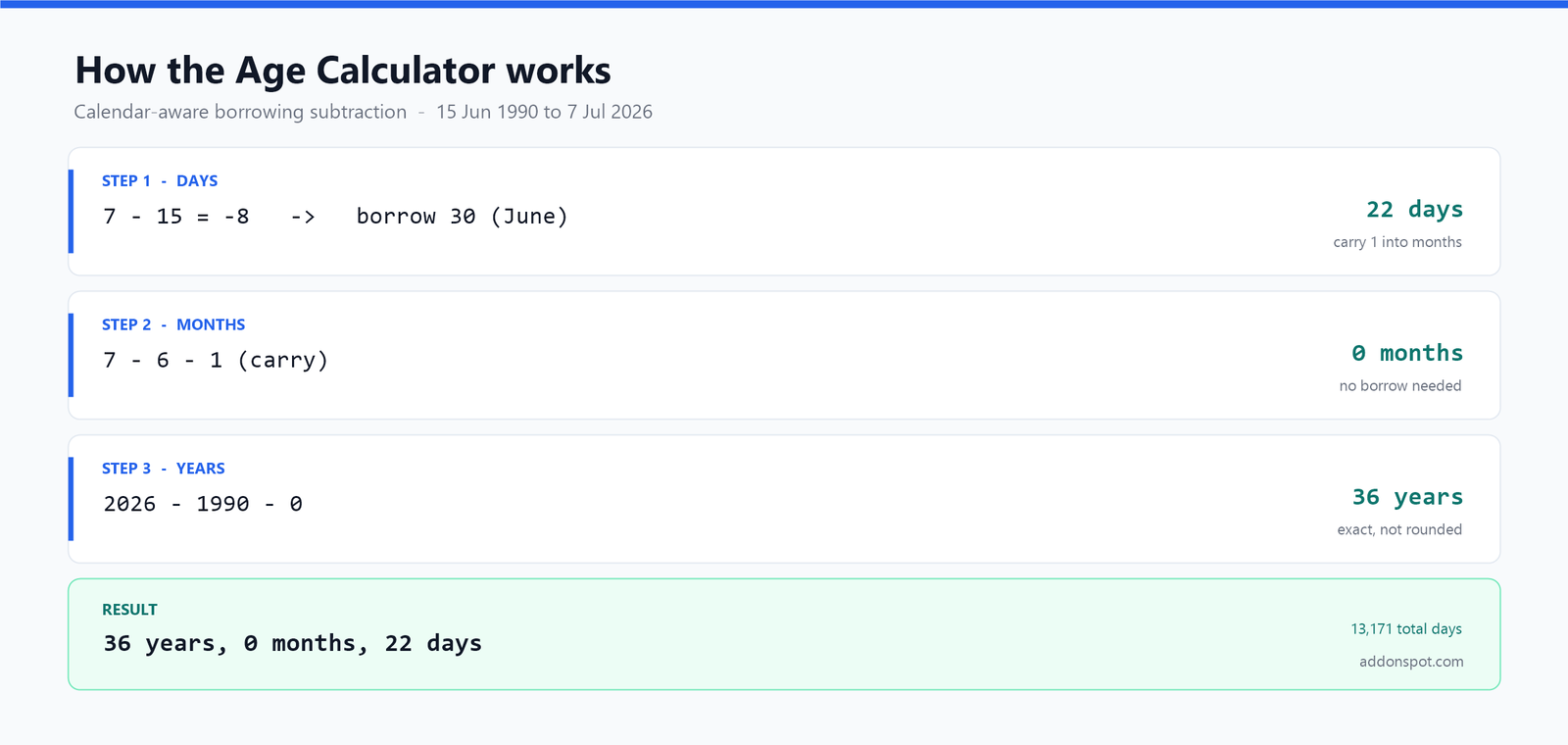
Why the borrowing step matters
The borrow in step 1 is the whole reason this approach is accurate. A naive calculation borrows a fixed 30 days, or worse, 31. The correct behaviour is to borrow the true length of the month that sits immediately before the target month — which is 28 days after a common-year January, 29 days after a leap-year January, 30 days after March, and so on. Because the borrow adapts to the real calendar, leap years and short months are handled without any special-case code, and the result matches what a registrar or a court would calculate by hand.
This is also the reason the years/months/days figure and the total months figure will not always convert into each other perfectly. The first is exact. The second is an average-based approximation offered as a quick rough total. That is expected behaviour, not a bug — see the FAQ below.
Example age calculation, step by step
Take a birth date of 15 June 1990 and a target date of 7 July 2026, and run the formula in order.
- Days.
7 − 15 = −8. Negative, so borrow. The month immediately before the target month (July 2026) is June 2026, which has 30 days.7 + 30 − 15 = 22 days, and carry 1 into the months column. - Months.
7 − 6 − 1 = 0 months. Not negative, so nothing further to borrow. - Years.
2026 − 1990 − 0 = 36 years.
Result: 36 years, 0 months, 22 days. The totals for the same span work out to 13,171 total days (that is 36 × 365 = 13,140, plus the nine leap days that fell in 1992, 1996, 2000, 2004, 2008, 2012, 2016, 2020 and 2024, plus the 22 days into July), which is 1,881 weeks and 4 days, 316,104 hours, and roughly 432 months.
Here are three more worked results, including the edge case that trips up most quick estimates:
| Date of birth | Measured to | Result | Total days |
|---|---|---|---|
| 15 Jun 1990 | 7 Jul 2026 | 36 years, 0 months, 22 days | 13,171 |
| 29 Feb 2000 | 28 Feb 2025 | 24 years, 11 months, 30 days | 9,131 |
| 1 Jan 2010 | 1 Jan 2026 | 16 years, 0 months, 0 days | 5,844 |
The second row is the interesting one. A leap-day baby born on 29 February has no exact birthday in a common year, so measured to 28 February 2025 the tool correctly reports just under 25 years rather than rounding up. Follow the formula and you can see why: 28 − 29 is negative, so it borrows the 31 days of January 2025 to give 30 days, which cascades a borrow through months and years. That is exactly the kind of edge case a “subtract the years” estimate gets wrong.
Number of days per month
Because the formula borrows the true length of the preceding month, it helps to have the month lengths in front of you when checking a calculation by hand.
| # | Month | Days | Notes |
|---|---|---|---|
| 1 | January | 31 | |
| 2 | February | 28 or 29 | 29 in a leap year |
| 3 | March | 31 | |
| 4 | April | 30 | |
| 5 | May | 31 | |
| 6 | June | 30 | |
| 7 | July | 31 | |
| 8 | August | 31 | Only back-to-back 31-day pair with July |
| 9 | September | 30 | |
| 10 | October | 31 | |
| 11 | November | 30 | |
| 12 | December | 31 |
A common year totals 365 days; a leap year totals 366. The leap rule itself has three parts, applied in order: a year divisible by 4 is a leap year, except a year divisible by 100, unless it is also divisible by 400. That is why 1900 was not a leap year but 2000 was — a distinction that quietly breaks a lot of hand-rolled date code. Across a full 400-year cycle there are 97 leap days, giving an average year of 365.2425 days and an average month of about 30.44 days, which is the figure used for the approximate total-months output above.
How to calculate age from a birthdate in Excel
If you need to work out ages in bulk — a class register, a customer list, a payroll file — a spreadsheet is the right tool, and the function you want is DATEDIF. Assume the date of birth sits in cell A2.
Excel formulas
| Goal | Formula | Example output |
|---|---|---|
| Age in whole years | =DATEDIF(A2,TODAY(),"Y") |
36 |
| Whole months since birth | =DATEDIF(A2,TODAY(),"M") |
432 |
| Total days lived | =DATEDIF(A2,TODAY(),"D") |
13171 |
| Full years, months and days | =DATEDIF(A2,TODAY(),"Y")&" years, "&DATEDIF(A2,TODAY(),"YM")&" months, "&DATEDIF(A2,TODAY(),"MD")&" days" |
36 years, 0 months, 22 days |
| Age on a fixed date in B2 | =DATEDIF(A2,B2,"Y") |
36 |
| Age without DATEDIF | =INT(YEARFRAC(A2,TODAY(),1)) |
36 |
The "YM" and "MD" unit codes are what let you reproduce the years/months/days breakdown this page’s calculator produces: "YM" returns leftover months ignoring years, and "MD" returns leftover days ignoring months and years. Microsoft’s reference for the DATEDIF function documents all six codes.
Google Sheets
Google Sheets supports the identical syntax, so every formula above works unchanged after pasting into a Sheets cell. The official Google Sheets DATEDIF reference covers the same DATEDIF(start_date, end_date, unit) signature. If TODAY() is recalculating more often than you want, swap it for a hard-coded date so the ages freeze at a chosen reporting date.
Two caveats worth knowing
First, DATEDIF is a legacy function carried over from Lotus 1-2-3. It does not appear in Excel’s formula autocomplete, so you have to type the whole name yourself — it is not missing, just hidden. Second, and more importantly, Microsoft explicitly warns that DATEDIF “may calculate incorrect results under certain scenarios,” with the "MD" unit being the known weak spot: it can return a negative number when the end day is earlier in the month than the start day. If the exact days figure matters, cross-check the spreadsheet output against the calculator on this page, which applies the borrowing rule correctly in every case.
Also make sure your cells are genuinely formatted as dates rather than text. A birth date stored as text will make DATEDIF return an error or a nonsense value, and it is the single most common reason a bulk age calculation goes wrong.
When do you need an exact chronological age calculation?
Working out an exact age is one of those small tasks that turns up far more often than you would expect, and in most of these cases an approximation is not good enough:
- Filling in official forms. Visa applications, medical intake forms, insurance paperwork and school registrations often ask for an age “as of” a specific date rather than today. Set that date in the second field and read the answer straight off.
- Checking eligibility cut-offs. School entry, driving, voting, alcohol purchase, pension access and every other threshold governed by the age of majority hinges on a date. Enter the cut-off date as the second field to see exactly how old someone is on that day — being one day short genuinely matters.
- Paediatric and medical dosing. For infants, age is tracked in weeks and days rather than years, and the difference between 11 weeks and 13 weeks can change a vaccination schedule. The weeks and days totals cover this directly.
- Sports and competition age groups. Youth leagues and age-graded events almost always define categories by age on a fixed cut-off date, not by age today.
- Legal and HR records. Retirement dates, length of service, and benefit qualification windows are all exact date arithmetic, and rounding introduces real liability.
- Counting down to a milestone. Set a future date to find out how old you will be at a wedding, a graduation, or the turn of a decade — and exactly how many days away it is.
- Marking anniversaries and “day” numbers. Couples and parents love round day-counts — the 1,000th day, the 10,000th day. The total-days figure makes those easy to spot.
- Estimating a pet’s age. Enter an adoption or birth date to track a pet’s exact age for vet visits and life-stage care.
- Settling curiosities. How many hours old is a newborn? How many weeks until a due date? How old would a historical figure be today? All one calculation away.
How is age counted differently around the world?
Most of the world uses the system this tool follows, usually called international age reckoning: you are zero years old at birth and turn one on your first birthday. It is not the only convention, and the differences are large enough to matter on forms and in conversation.
| System | Age at birth | When it increases | Where it is used |
|---|---|---|---|
| International reckoning | 0 | On each birthday | Global standard; used by this calculator |
| Traditional East Asian reckoning | 1 | On New Year’s Day, for everyone at once | Historically China, Japan, Korea, Vietnam; now largely informal |
| Korean “year age” | 0 | On 1 January | Retained in Korea for a few specific legal purposes |
| Lunar-calendar birthdays | 0 | On the lunar-calendar anniversary | Common culturally alongside civil ages |
The gap can be startling. Under traditional East Asian age reckoning, a baby born on 31 December is one year old at birth and turns two the very next day — while being one day old by the international count. South Korea standardised on international reckoning for official purposes in June 2023, which instantly made the entire population one or two years “younger” on paper overnight.
There is a further wrinkle even within the international system: the exact moment of the birthday. Most jurisdictions treat you as attaining an age at the start of your birthday, but a handful of legal traditions have historically treated it as the day before. For anything with legal consequences, check the local rule rather than assuming. This calculator uses the standard international reckoning, counting completed years, months and days since birth.
Understanding the different units
The calculator shows the same span several ways because different situations call for different units, and they genuinely do not convert to one another cleanly.
Years, months, and days is the exact, human-readable age — the one you write on a form. Total months and total weeks are useful for tracking a baby’s development or a subscription period. Total days is the number couples and enthusiasts celebrate, and the one used in fields like interest calculation and length-of-service records. Total hours is mostly for curiosity, but it makes a striking figure for a newborn or a big birthday.
One thing worth repeating: the “total months” figure is an approximation based on an average month length, while the “years, months, days” figure is exact. Because months vary from 28 to 31 days, the two will not always convert perfectly — that is expected, not an error.
Why use this age calculator
- It’s exact, not rounded. The calculation properly borrows days from the correct preceding month and accounts for leap years, so the years/months/days figure is accurate rather than approximate.
- Any two dates. It isn’t limited to “age today” — set a target date to find how old someone was (or will be) on a specific day, useful for eligibility cut-offs and anniversaries.
- Multiple units at a glance. Seeing the same span expressed in months, weeks, days, and hours is useful for planning, record-keeping, and the occasional fun fact.
- No spreadsheet quirks. Unlike
DATEDIF, it has no known failure mode on the days component, and there is nothing to format or type correctly. - Private and instant. All math happens in your browser; no dates are uploaded or stored, and there’s no signup. See our privacy policy for the details.
Frequently asked questions
What formula does the age calculator use?
What is chronological age?
What is the difference between chronological age and biological age?
How do I calculate age from a birthdate in Excel?
How many days are in each month?
Does the calculator account for leap years?
How is the age of someone born on 29 February calculated?
Can I calculate age on a future date?
How many days have I been alive?
Does it count the birthday itself?
Why are total months and years/months slightly different?
What happens if the second date is before the birth date?
Are my dates kept private?
Is the age calculator free?
Related tools and further reading
- Sentence & Word Counter — another instant, private browser tool for writing to an exact limit.
- Anagram Maker — quick wordplay for names and puzzles.
- Brand Name Generator — name a project or business idea.
- Book Title Generator — title a manuscript or series.
- Gamertag Generator — build a handle that is still available.
- Clan Name Generator — name a squad or guild.
This tool lives in our Text Tools & Calculators collection, alongside the rest of the free AddonSpot tools. Planning a milestone or launch date? Pair it with the timeline thinking in our brand name checklist, or browse more write-ups on the guides and blog. Questions about how our tools work are answered on the FAQ page — and if there is a calculator you wish existed, suggest a tool and we will take a look.