Your gamertag follows you into every lobby, leaderboard, and clip. It’s the name teammates call out, the tag that shows up when you top the scoreboard, and the identity you carry across console and PC. The Gamertag Generator turns your real name or a favorite word into a list of tags that sound the way you want to be perceived — clean and readable, edgy and dark, or styled with classic leetspeak. Whether you’re setting up a brand-new profile, rebranding after a rough season, or just tired of adding random numbers to a taken name, this tool gives you a fast shortlist of options that still feel like you.
Gamertag Generator
Unique gamertags built from your name or a keyword.
How to use the Gamertag Generator
- Type a name or keyword. Your first name, a nickname, or a word you like — “frost,” “ninja,” “alex.”
- Pick a style. Clean keeps it plain and legible, Leetspeak swaps letters for numbers, Dark leans menacing, and Mixed samples from all of them.
- Decide on numbers. Turn numbers on to boost availability, or off for a cleaner look.
- Hit Generate. You’ll get a grid of gamertags, each with a Copy button.
- Test before you claim. Copy your top picks and try them on your platform, since availability changes constantly.
How does the Gamertag Generator work?
The generator isn’t shuffling a word list at random. It builds every tag from your keyword using a handful of construction patterns, then filters the results so what you see could actually be registered.
| Pattern | What it does | Example from “frost” |
|---|---|---|
| Prefix | Puts a mood or role word in front | VoidFrost, ProFrost |
| Suffix | Adds a role, title or descriptor after | FrostReaper, FrostPlays |
| Wrap | Combines both ends around your word | GrimFrostBane |
| Leet substitution | Swaps letters for lookalike digits | Fr0st, phr0st |
| Bracketing | Applies the classic xX…Xx frame | xXfrostXx |
| Numeric tail | Appends a short number when enabled | Frost77, FrostGG9 |
What each style changes
The style setting decides which vocabulary the prefixes and suffixes come from. Clean uses plain, legible words that read well on a scoreboard (pro, team, live, plays). Dark pulls from a harsher register (void, grim, reaper, bane, wraith). Leetspeak applies character substitutions on top of whatever it builds. Mixed samples across all three, which is the best starting point when you don’t yet know the persona you want.
Why results stay short
Every result is capped at a length that fits the strictest mainstream platform, so you won’t fall for a tag that Xbox then rejects for being too long. That single constraint removes the most common frustration in naming: finding the perfect tag and discovering it doesn’t fit.
Everything runs in your browser. Your keyword is never uploaded and nothing is stored — see our privacy policy.
Why use this gamertag generator
- It respects platform length limits. Results are capped at a sensible length, so you won’t fall in love with a tag that’s too long to actually register.
- It offers real stylistic range. The same keyword can feel professional or intimidating depending on the style you choose, so one word can serve very different personas.
- It solves the “already taken” problem. Optional numbers and prefix/suffix combinations create variants that dodge the most-claimed names without resorting to a wall of digits.
- It keeps your name recognisable. Because every tag is built around the word you typed, the shortlist still sounds like you rather than like a random word generator.
- It’s instant and unlimited. Regenerate as many times as you want; nothing is stored and no account is required.
Gamertag character limits by platform
Before you commit, it helps to know what will actually fit. Length rules differ sharply between platforms, and the strictest one should drive your choice if you plan to use the same tag everywhere.
| Platform | What it’s called | Length | Notes |
|---|---|---|---|
| Xbox | Gamertag | 3–12 characters | If taken, a numeric suffix (#1234) is auto-assigned |
| PlayStation | Online ID | 3–16 characters | Must start with a letter; allows – and _ |
| Epic Games / Fortnite | Display name | 3–16 characters | Shared across all Epic titles |
| Nintendo Switch | Nickname | Up to 10 characters | Profile nickname, not a unique account ID |
| Steam | Profile name | Up to 32 characters | Display only — doesn’t have to be unique |
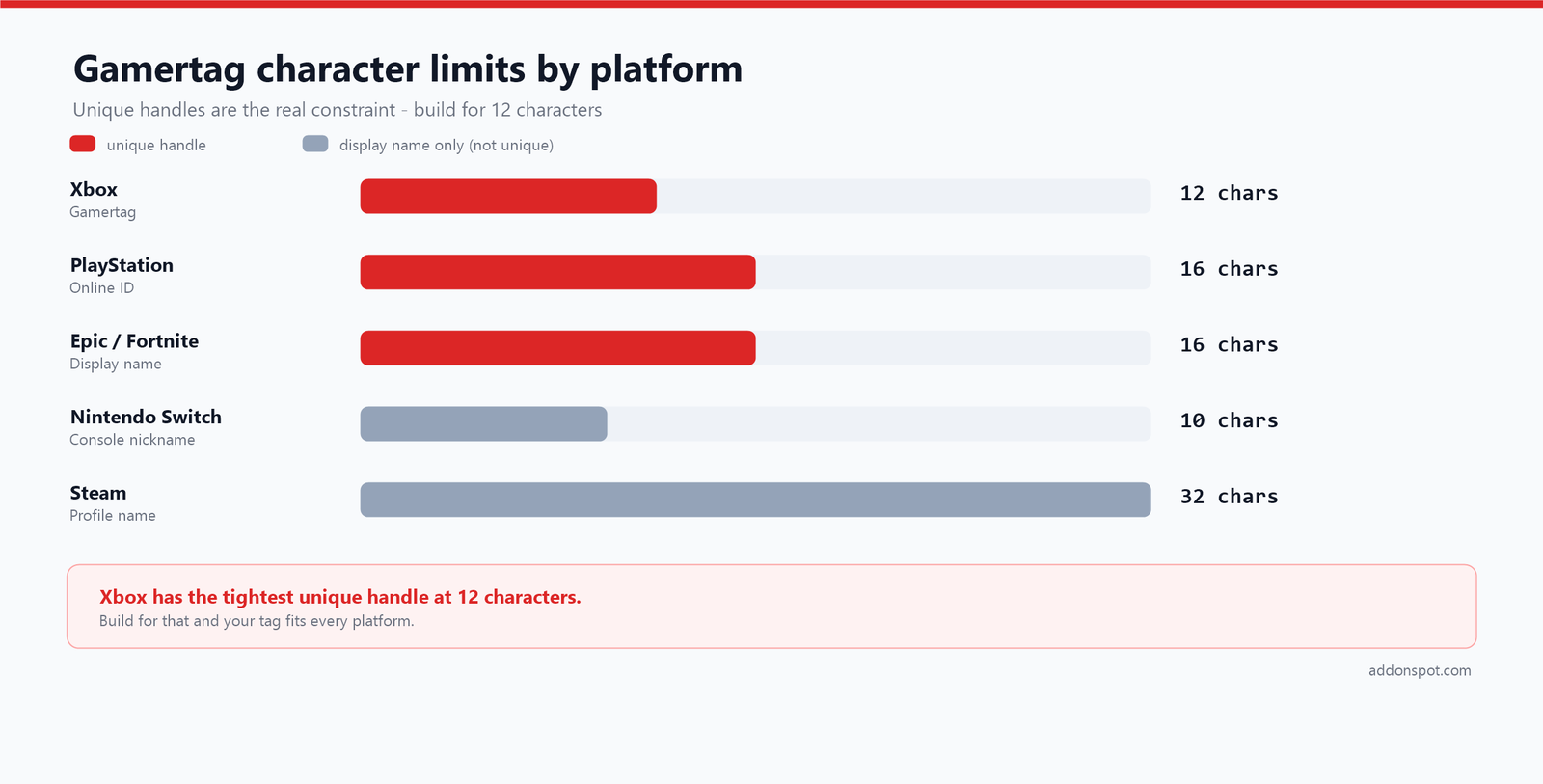
The practical takeaway: 12 characters is your real ceiling if you want one tag everywhere, because Xbox is the tightest. Build for that limit and everything else fits comfortably. Platforms do revise these rules, so confirm against the official pages — Xbox publishes its gamertag guidelines and Sony documents changing your PSN online ID.
Need to check a tag against a limit quickly? Paste it into our Sentence & Word Counter for an instant character count.
Gamertag styles explained
Clean
Plain, readable, no substitutions. Clean tags age best and are the only sensible choice if you stream, compete, or ever want a sponsor to type your name correctly. They’re also the hardest to get, because legible words are claimed first.
Dark
Built from a harsher vocabulary — void, grim, reaper, wraith, bane. Well-suited to shooters, extraction games and horror content. The risk is genericness: these words are heavily used, so lean on an unusual keyword to keep the result distinctive.
Leetspeak
The oldest convention in online gaming, and still the most reliable way to claim a taken word. Leet replaces letters with visually similar digits:
| Letter | Becomes | Example |
|---|---|---|
| E | 3 | reaper → r3aper |
| O | 0 | frost → fr0st |
| A | 4 | alex → 4lex |
| I / L | 1 | nitro → n1tro |
| S | 5 | ash → a5h |
| T | 7 | storm → s7orm |
One substitution usually looks intentional. Three or more looks like a password, and nobody will spell it correctly in a voice channel.
Mixed
Samples from all three pools. Use this first, notice which results you keep copying, then switch to that specific style to go deeper.
Example gamertags
| Keyword | Style | Sample tags |
|---|---|---|
| frost | Dark | FrostReaper, VoidFrost, GrimFrostBane |
| alex | Leetspeak | xX4l3xXx, iam4lexop, 4l3xz |
| nova | Clean | ProNovaGG, TeamNovaLive, NovaPlays7 |
| ash | Mixed | DarkAshWraith, AshGaming99, xXashXx |
What makes a good gamertag
It survives being said out loud
The single best test: say it in a voice channel and see whether anyone can repeat it. Tags requiring “that’s with a zero, not an O” get shortened by your teammates within a week — and the nickname they invent becomes your real tag whether you like it or not.
It’s short enough to read at a glance
Killfeeds, scoreboards and spectator overlays truncate aggressively. A tag of 8 to 12 characters stays fully visible almost everywhere; longer ones get clipped exactly when you most want to be seen.
It doesn’t date itself
Tags tied to a single game, a year, or your current age become dead weight fast. ApexKing2024 reads as abandoned two years later, and xX_Sniper_Xx anchors you to one genre. A name built on your own name or a genuine interest travels with you.
It avoids the number wall
Ending with a long random string is the clearest possible signal that your first choice was taken. If you need digits, make them mean something — a jersey number, a date that matters — and keep it to two.
It reads cleanly as one word
Run the letters together and read them fresh. Compound tags occasionally hide an unintended word across the join, and a lobby full of strangers will find it before you do.
The “already taken” problem
Every short, clean word was claimed years ago. These are the approaches that actually work, roughly in order of how good the result looks:
- Compound two short words. FrostBane beats Frost4471 in every respect, and two-word combinations are far less contested than single words.
- Add a role word. Plays, GG, TV, Live, HQ — these read as deliberate branding rather than as a fallback.
- Use one leet substitution. A single swap often frees a name while staying pronounceable.
- Change the vowel pattern. Dropping or doubling a vowel (Frst, Froost) keeps the sound while changing the string.
- Rearrange your own name. An anagram gives you something personal and almost certainly unclaimed — our Anagram Maker is built for exactly this.
- Accept a numeric suffix last. On Xbox this happens automatically anyway, and a hidden #1234 is less damaging than baking digits into the visible name.
For a repeatable method rather than a list of tricks, read our full guide on how to pick a gamertag that isn’t already taken.
How to change your gamertag
Xbox
Sign in and open your profile, choose Customize profile, then select your gamertag to edit it. Your first change is free; subsequent changes carry a fee. If the tag you want is already in use, Xbox appends an auto-assigned numeric suffix that you cannot choose or remove — the only way to avoid one is to pick a name nobody has taken.
PlayStation
Go to Settings → Users and Accounts → Account → Profile → Online ID. Your online ID must be 3 to 16 characters, must begin with a letter, and may contain letters, numbers, hyphens and underscores. Sony keeps your old ID reserved so nobody else can immediately take it, and you can revert once if the change causes problems in older games.
Steam, Epic and Nintendo
Steam profile names are display-only, aren’t unique, and can be changed freely from your profile page. Epic display names apply across every Epic title including Fortnite and are limited to 16 characters. Nintendo Switch nicknames are set per user profile on the console and cap at 10 characters.
One warning that applies everywhere: older games sometimes cache your previous name in save data, friend lists or leaderboards. If you compete or hold records, check that a rename won’t orphan your stats before you commit.
Building one identity across platforms
If you stream, upload highlights, or plan to take gaming seriously, the tag itself matters less than using the same one everywhere. Every clip, stat page and shoutout should point back to a single searchable name.
Check availability on all your platforms before claiming any of them — it is far better to take your second-choice tag on all five than your first choice on one. Extend the check to the social side too: match your handle on TikTok with our TikTok Name Generator, and if the tag is becoming a brand with merch or a domain behind it, run it through the brand name checklist and the Brand Name Generator first.
Playing as part of a squad? Give the team its own identity with the Clan Name Generator, and keep the clan tag short enough to sit in front of your name without hitting the character limit.
Frequently asked questions
What is leetspeak in a gamertag?
How long can a gamertag be?
How do I change my Xbox gamertag?
What are the rules for a PlayStation online ID?
Do I have to add numbers to my gamertag?
How do I get a gamertag that isn’t taken?
Can I use the same gamertag on Xbox, PlayStation, and Steam?
Will changing my gamertag affect my stats or friends?
What makes a good gamertag?
Is my keyword saved anywhere?
Is the gamertag generator free?
Related tools and further reading
- Clan Name Generator — name the team behind the tag.
- TikTok Name Generator — match your handle for clips and highlights.
- Anagram Maker — rearrange your name into something unexpected.
- Sentence & Word Counter — check a tag against a character limit instantly.
- Brand Name Generator — for when the tag becomes a brand.
- Book Title Generator — for creators publishing alongside their channel.
Browse the full username and handle generators and gaming name generators collections, or the rest of the free tools on AddonSpot. Want a repeatable method rather than random ideas? Read how to pick a gamertag that isn’t already taken, or the band-naming framework, which applies neatly to squads and stream brands. More guides live on the blog, common questions are covered in the FAQ, and you can suggest a tool any time.