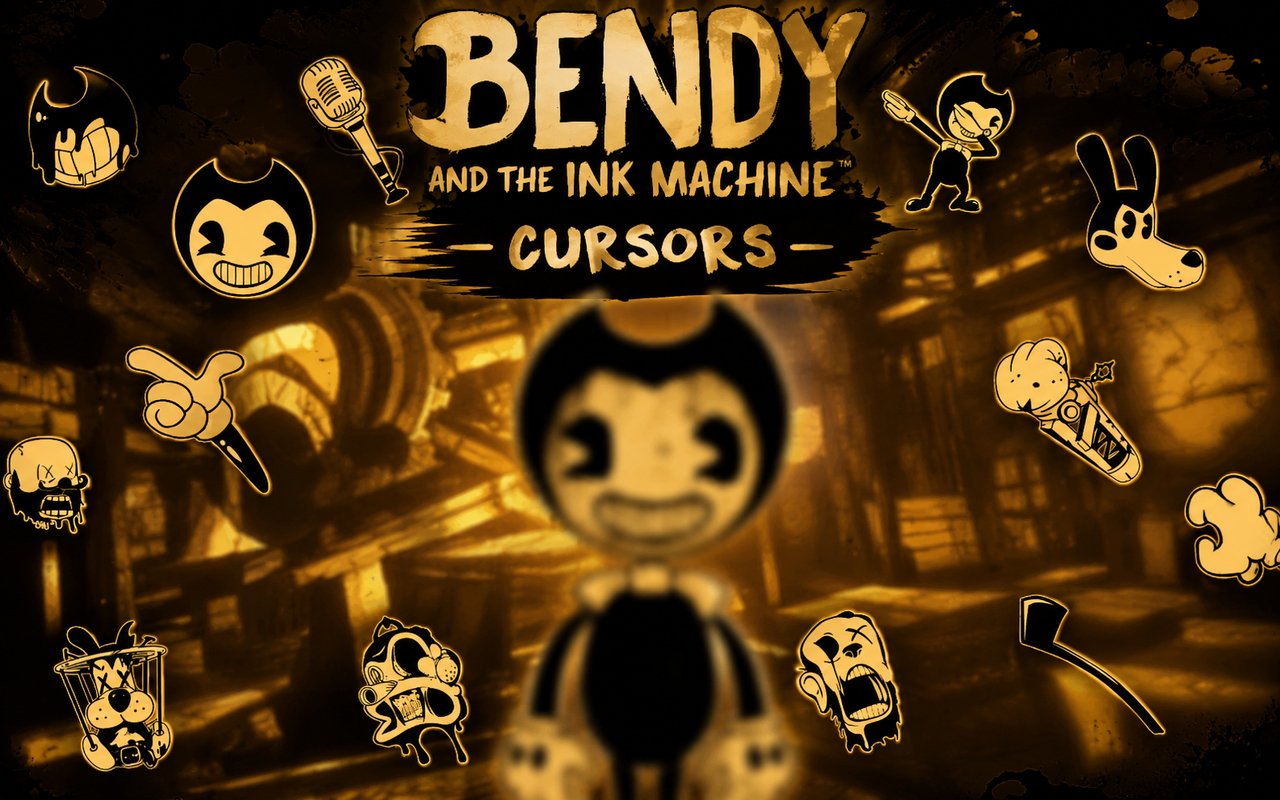
What Is The Bendy and the Ink Machine Cursor?
Bendy and the Ink Machine Cursor is a Chrome extension that replaces your standard browser cursor with custom designs drawn from the beloved horror-puzzle franchise. With over 20 unique cursor options, it brings the ink-drenched world of the game directly into your everyday browsing experience. Each cursor is crafted to reflect the distinctive look and feel of the source material.
Bendy and the Ink Machine is a first-person survival horror game set inside a crumbling cartoon animation studio filled with ink creatures and dark secrets. Iconic characters such as Bendy the Dancing Demon, Boris the Wolf, and Alice Angel are central to the story, each with a design rooted in vintage rubber-hose animation aesthetics. The game has built a dedicated fan community drawn to its unsettling atmosphere and unique visual identity.
This extension is a natural fit for fans of the game who want to carry a piece of that world into their browser without any disruption to how they work or browse.
Key Features of The Bendy and the Ink Machine Cursor Extension
Complete Bendy and the Ink Machine Cursor Collection
The extension includes cursors featuring some of the most recognizable characters and elements from the game, including Bendy, Boris the Wolf, Alice Angel, Beast Bendy, the Ink Demon, and several ink-themed props and symbols. Whether you prefer the cheerful face of classic Bendy or the more menacing look of Beast Bendy, there is a cursor to suit your mood. The full roster includes:
- Bendy the Dancing Demon
- Boris the Wolf
- Alice Angel
- Beast Bendy
- The Ink Demon
- Ink-themed prop and symbol designs
Original Animation Art Style
Every cursor in the collection is rendered in the game’s signature vintage cartoon style, featuring heavy black outlines, stark contrasts, and an ink-soaked monochromatic palette occasionally accented with yellow and white. The rubber-hose animation influence gives the characters a rounded, exaggerated quality that is instantly recognizable to fans. Fine details such as Bendy’s pie-cut eyes and Boris’s floppy ears are preserved even at small cursor sizes. This visual consistency makes each cursor feel like it belongs directly inside the world of the game.
Adjustable Cursor Size
The extension includes a size slider that lets you scale your cursor up or down to suit your display and personal preference. Whether you are on a compact laptop screen or a large desktop monitor, you can dial in the exact size that feels right. This is especially useful for high-resolution displays where the default cursor size can appear too small.
Favorites System for Quick Switching
You can bookmark your preferred cursor designs using the built-in favorites system, making it easy to return to them without scrolling through the entire library. Saved favorites persist across browser sessions, so your preferred selections are always ready when you reopen Chrome. This feature is particularly handy if you like to rotate between a few designs depending on your mood or activity.
Lightweight and Performance-Friendly
The extension is designed to run quietly in the background without placing any demand on your system resources. There is no measurable impact on Chrome’s speed, memory usage, or page load times, even during long browsing sessions or while running other demanding applications. It performs just as smoothly on older machines as it does on modern hardware.
Easy Toggle On and Off
A simple one-click toggle lets you switch the custom cursor off whenever you need to revert to the standard browser cursor, such as during a video call, a work presentation, or while using a web application that requires precise pointer behavior. Re-enabling the extension is equally instant, and it will remember whichever cursor design was active when you last toggled it off.
How to Install The Bendy and the Ink Machine Cursor
- Open Google Chrome on your desktop or laptop.
- Go to the Chrome Web Store and search for Bendy and the Ink Machine Cursor.
- Click the extension listing to open its detail page.
- Click Add to Chrome and confirm when the popup appears.
- Click the extension icon in your Chrome toolbar to open the cursor library.
- Select any design to activate it immediately — no browser restart needed.
Why Bendy and the Ink Machine Cursor Fans Love This Extension
For players who spent hours navigating the dark corridors of Joey Drew Studios, seeing Bendy’s grinning face or Alice Angel’s cracked halo on their cursor is a small but genuine nod to a game that left a lasting impression. The horror-puzzle atmosphere, the haunting soundtrack, and the mystery of the ink machine created a world that fans have never quite stopped thinking about. Having those characters present during everyday browsing keeps that connection alive in a low-key, personal way. It is a subtle reminder of a story that resonated deeply with a large and passionate community.
Students who played the game during its peak popularity, now older and spending more time at their desks, will find this extension a satisfying way to personalize their workspace without altering anything functional. It is equally well suited to content creators, streamers, and fan artists who want their browser environment to reflect the media they care most about.
Frequently Asked Questions
Does this extension work on all websites?
The cursor is active across virtually all websites you visit in Chrome. A small number of sites with strict content security policies may limit custom cursor behavior, but this is uncommon and the extension works normally on the vast majority of pages.
Can I use multiple Bendy and the Ink Machine Cursor cursors at once?
Only one cursor can be active at a time, but switching between designs is quick. The favorites system lets you save your preferred characters and switch between them in seconds without scrolling through the entire collection.
Will this extension slow down my browser?
No. The Bendy and the Ink Machine Cursor extension is built to be lightweight and runs quietly in the background. It has no noticeable impact on Chrome’s speed, memory usage, or page load performance.
Is the Bendy and the Ink Machine Cursor extension free?
Yes. The extension is completely free to download and use from the Chrome Web Store. You get access to the full cursor library without any subscription or in-app purchases.




Community comments
Comments are reviewed before they appear publicly.