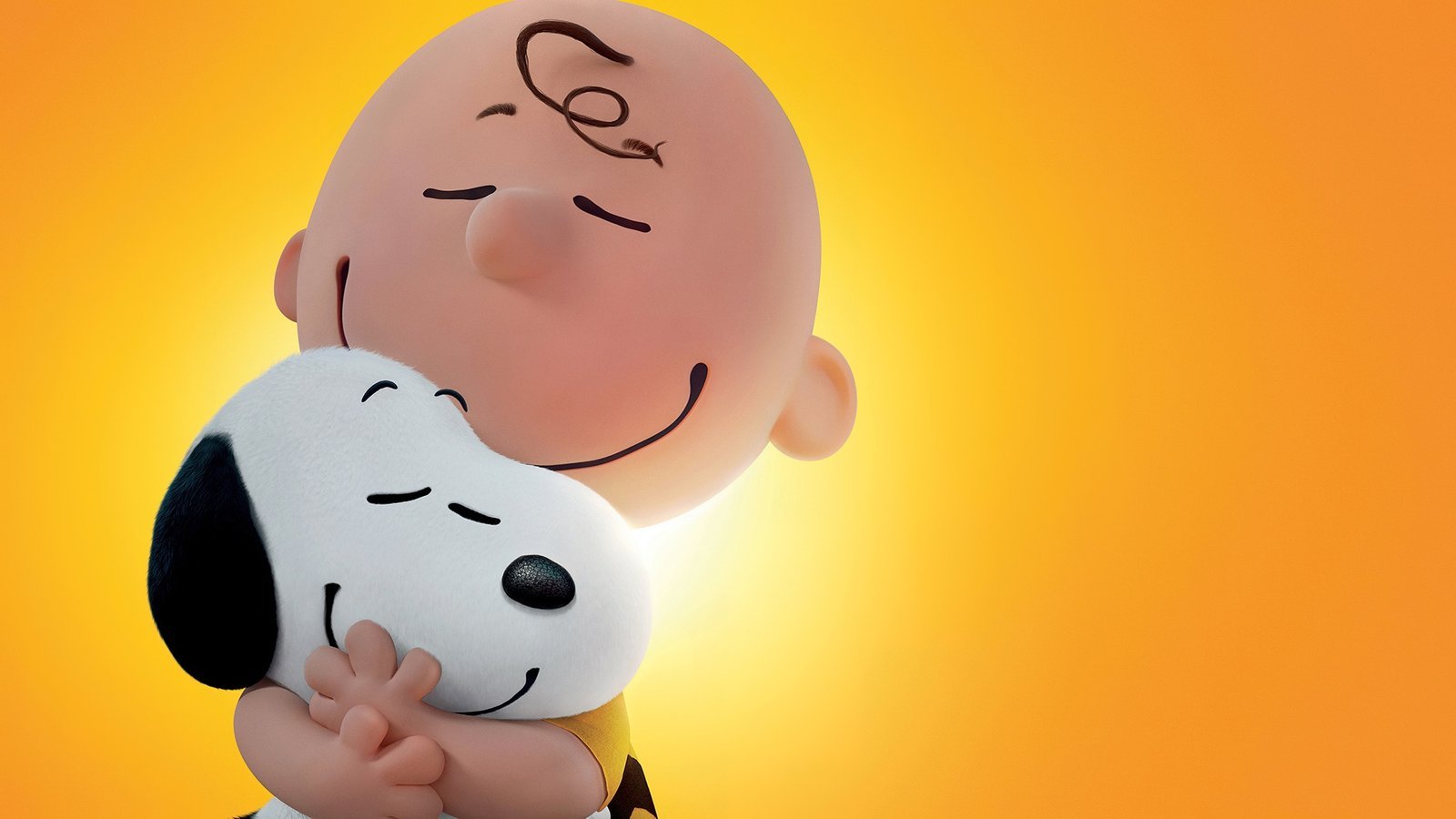
A familiar red doghouse, a cheerful yellow bird, and an unforgettable group of friends can make even an ordinary browser tab feel inviting. Peanuts Wallpapers New Tab adds that classic comic-strip charm to Chrome with HD Snoopy, Charlie Brown, and Peanuts-inspired cartoon wallpaper backgrounds.
Fans of Charles M. Schulz’s beloved comic strip will appreciate a browser theme centered on playful character art, comforting colors, and a touch of nostalgia. Along with the wallpapers, the extension includes useful features such as a search bar, clock, date, keyboard shortcuts, and quick links to popular websites.
Enjoy HD Peanuts Wallpapers on Every Chrome New Tab
The Peanuts universe has a recognizable visual style: simple lines, expressive characters, and everyday moments that can be funny, thoughtful, or heartwarming. Those qualities make Peanuts wallpapers especially appealing for users who enjoy friendly cartoon artwork rather than busy, high-intensity backgrounds.
Each time you open a new tab, the extension showcases an HD Peanuts wallpaper from its included collection. Specific characters and scenes depend on the images packaged with the extension, so its Chrome Web Store screenshots are the best way to check individual designs.
Key Features of Peanuts Wallpapers New Tab
HD Snoopy and Peanuts Cartoon Wallpapers
Enjoy handpicked high-resolution artwork inspired by the Peanuts cast, classic comic visuals, and cute cartoon aesthetics. The wallpapers add personality and warmth to the Chrome new tab page.
Smart Search Bar
Search the web directly from your new tab with the search provider you already use. The extension does not change your selected default search engine.
Clock and Date Display
Keep the time and date within view while enjoying a cartoon background. Choose from four screen positions and four formats to match your preferred layout.
One-Click Website Shortcuts
Convenient shortcut tiles make it easy to open YouTube, ChatGPT, Instagram, and X from your new tab.
Keyboard Shortcuts for Faster Search
Press / or Ctrl+K to focus the search bar and begin typing without extra clicks.
Privacy-Focused New Tab Experience
You do not need an account or sign-in to use the extension. It is designed without browsing activity tracking; your layout and shortcut choices remain in your browser. The extension requests the search permission but no host permissions to read the websites you visit. Shortcut tiles retrieve website icons from Google’s public favicon service.
Why Choose Peanuts Wallpapers for Chrome?
Peanuts has long appealed to readers who enjoy its blend of humor, friendship, and understated storytelling. A Snoopy-inspired new tab can bring a little of that personality into a familiar daily routine. It is a natural option for comic-strip fans, cartoon lovers, people who enjoy cozy illustrations, and anyone interested in cute browser backgrounds.
The extension is also practical: the search field, date, clock, and frequently used site shortcuts remain easy to reach, so a themed browser does not have to sacrifice everyday convenience.
Favorite Peanuts Characters and Wallpaper Ideas
Snoopy Wallpapers: The Imaginative Beagle
Snoopy is one of the most recognizable characters in the Peanuts comic strip. His imaginative adventures, relaxed poses, and famous red doghouse lend themselves to cheerful and nostalgic wallpaper artwork. Snoopy backgrounds are especially popular with people who enjoy simple, cute character designs.
Charlie Brown Wallpapers: A Classic Comic Hero
Charlie Brown is known for his round head, zigzag-striped shirt, and persistent optimism despite frequent disappointments. Artwork featuring him often captures the familiar humor and warmth that made Peanuts a lasting favorite.
Woodstock Wallpapers: Snoopy’s Little Friend
Woodstock, the small yellow bird often seen alongside Snoopy, adds a playful pop of color. Snoopy and Woodstock illustrations can be particularly charming in simple cartoon compositions and light pastel backgrounds.
Lucy, Linus, and the Peanuts Gang
Lucy van Pelt, Linus van Pelt, Peppermint Patty, and other Peanuts characters bring different personalities to the comic-strip world. From Linus and his blanket to Lucy’s confident expressions, these familiar details help give Peanuts-themed imagery variety.
Classic Snoopy Red Doghouse Backgrounds
Snoopy resting on his red doghouse is among the most recognizable images associated with the series. The bright red roof, white beagle, and clean cartoon style make an appealing visual combination for a browser background.
These character and composition examples describe the Peanuts universe; they do not guarantee that each scene appears in the extension’s actual collection.
Peanuts Wallpaper Styles for Different Aesthetics
Cute and Kawaii Snoopy Wallpapers
Rounded shapes, expressive faces, friendly character poses, and gentle colors make Peanuts-inspired artwork suitable for fans of cute and kawaii aesthetics. A simple Snoopy illustration can feel just as inviting as a more detailed cartoon scene.
Pastel Peanuts Backgrounds
Soft pink, beige, sky blue, and other understated tones pair naturally with classic comic illustrations. These backgrounds can create a calm atmosphere while preserving the characters’ distinct look.
Minimalist Peanuts Character Art
A clean background with a small Snoopy or Charlie Brown illustration is well suited to a minimalist new tab. For another uncluttered wallpaper approach, explore Minimal Wallpapers New Tab.
Vintage Comic Strip Aesthetics
Peanuts began as a newspaper comic strip in 1950. Its simple black lines, recognizable panel compositions, and timeless expressions give vintage-inspired wallpapers a nostalgic character that still feels distinctive today.
Cozy Cartoon Wallpaper Designs
Warm neutral colors, familiar characters, and quiet everyday scenes can create a comforting visual tone. For another character-based browser theme, see Hello Kitty Quotes Wallpapers.
The Enduring Appeal of Peanuts and Snoopy
Created by Charles M. Schulz, Peanuts introduced generations of readers to Charlie Brown, Snoopy, and their friends. The comic strip’s humor often grows out of familiar experiences—trying again, feeling uncertain, celebrating friendships, and finding moments of joy in everyday life.
That storytelling tradition helps explain why Peanuts imagery continues to resonate with both longtime readers and people who simply appreciate its illustration style. A Peanuts wallpaper can feel playful without overwhelming the screen, which makes it well suited to Chrome’s frequently viewed new tab page.
More Cute Cartoon Themes on AddonSpot
If you enjoy adorable animated characters and nostalgic cartoon backgrounds, take a look at My Little Pony Wallpapers for colorful character art. The site also features Cartoon Cursor for another way to add cartoon personality to your browsing experience.
How to Install Peanuts Wallpapers New Tab in Google Chrome
- Find the Peanuts Wallpapers New Tab extension on the Chrome Web Store when its listing becomes available.
- Select Add to Chrome on the verified listing.
- Confirm the installation by clicking Add extension.
- Open a new Chrome tab to see a Peanuts-themed wallpaper.
- Adjust the available clock, date, and layout options in the extension settings.
Review the Chrome Web Store page for its current availability, screenshots, publisher, and permission details before installing.
Frequently Asked Questions (FAQ)
What is Peanuts Wallpapers New Tab?
It is a Chrome extension that showcases HD Peanuts-themed cartoon wallpapers on the new tab page while providing search, a clock, date, keyboard shortcuts, and website links.
Does the extension show Snoopy wallpapers?
The extension focuses on Peanuts-themed artwork, including Snoopy-inspired visuals. Individual characters and scenes depend on the wallpapers included in its image collection.
Will a new wallpaper appear every time I open a Chrome tab?
The extension showcases an HD Peanuts wallpaper each time you open a new tab, using its included wallpaper collection.
Does the extension include Charlie Brown and Woodstock backgrounds?
Charlie Brown and Woodstock are central characters in the Peanuts universe. The exact backgrounds included depend on the collection; check the Chrome Web Store screenshots to confirm particular images.
Does Peanuts Wallpapers change my default search engine?
No. The search bar uses your existing default search provider without changing that setting.
Can I customize the clock and date display?
Yes. There are four display positions and four formats for the clock and date.
What quick-access website links are available?
Shortcut tiles provide links to YouTube, ChatGPT, Instagram, and X.
Does the extension track my browsing history?
It is designed without browsing activity tracking and does not request host permissions to read the websites you visit.
Does it change my computer’s desktop wallpaper?
No. It changes the Chrome new tab page, not your Windows or macOS desktop background.
Is this an official Peanuts or Snoopy extension?
No. This is an unofficial fan-made browser extension and is not affiliated with or endorsed by Peanuts Worldwide or any associated rights holder.
How can I remove Peanuts Wallpapers New Tab?
Open Chrome’s Extensions management page, find Peanuts Wallpapers New Tab, and select Remove.
Give Chrome a Little Peanuts Charm
Peanuts Wallpapers New Tab combines warm, recognizable cartoon imagery with useful tools for everyday browsing. Fans of Snoopy, Charlie Brown, Woodstock, and classic comic art can bring a cheerful aesthetic to Chrome without losing convenient access to search, time, and favorite sites.
Visit the extension’s Chrome Web Store listing when available to review its latest screenshots, features, permissions, and installation details.
Unofficial fan-made extension. Peanuts, Snoopy, Charlie Brown, Woodstock, and related character designs, names, logos, and artwork belong to their respective rights holders. This extension is not affiliated with or endorsed by Peanuts Worldwide or other official rights holders.

Community comments
Comments are reviewed before they appear publicly.