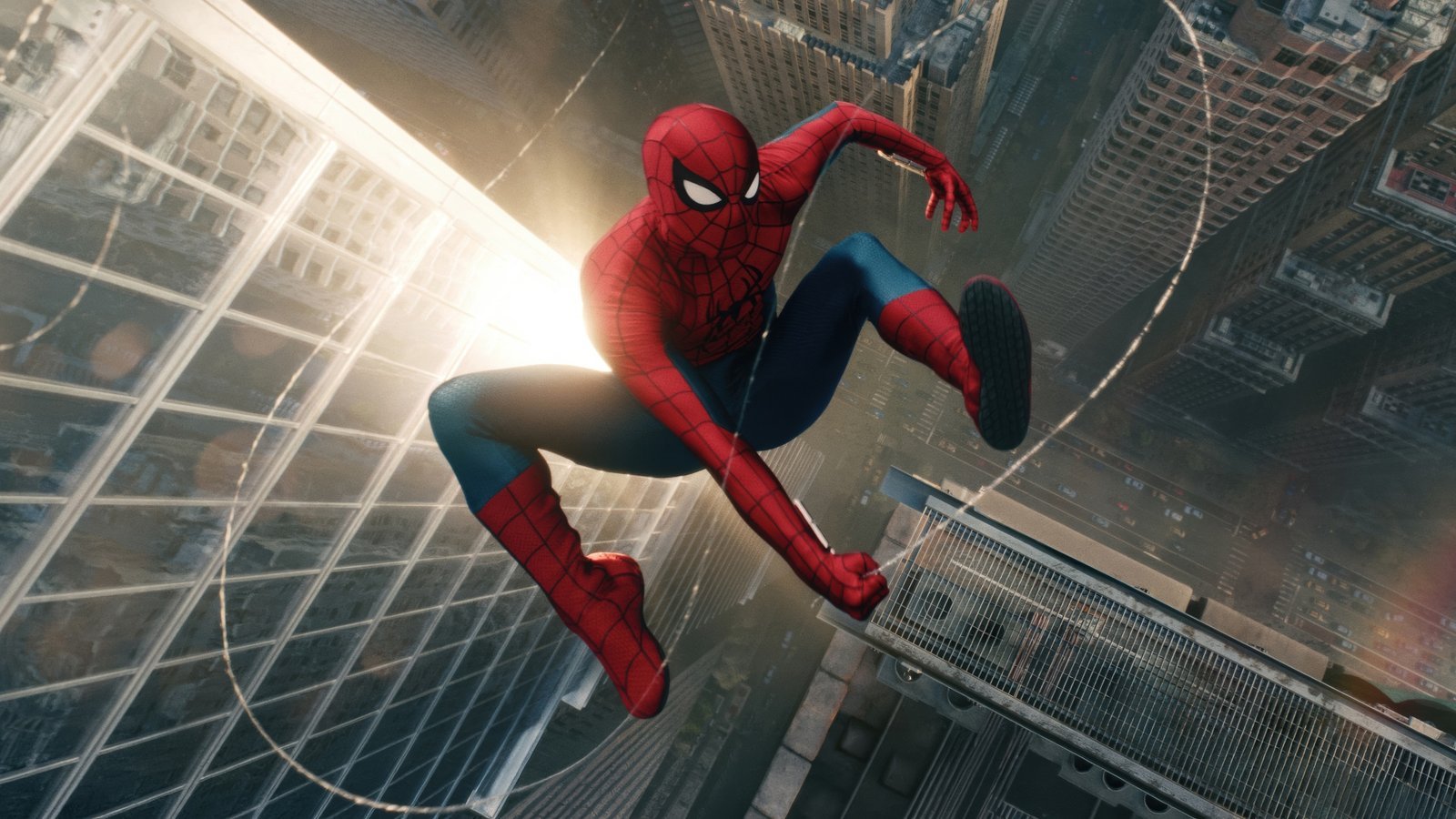
A new Spider-Man adventure deserves a browser look with the same energy. Spider-Man Brand New Day Wallpapers New Tab brings movie-inspired superhero style to Google Chrome, with HD Spider-Man wallpaper imagery, dramatic city backgrounds, and a practical new tab layout. The extension is designed for fans who enjoy Peter Parker, the iconic red-and-blue suit, and the thrill of web-slinging through New York City.
Whether you follow Spider-Man through Marvel comics, animated adventures, or Tom Holland’s live-action films, your Chrome new tab can celebrate the character every day. Alongside its superhero-inspired wallpapers, the extension includes a smart search bar, customizable clock and date, keyboard search shortcuts, and quick links to popular sites.
This guide explores the look and features of the Spider-Man Brand New Day Chrome extension, the film’s visual appeal, and how a Spider-Man-themed new tab can fit naturally into everyday browsing.
Enjoy HD Spider-Man Brand New Day Wallpapers on Every New Tab
Instead of opening another plain browser tab, enjoy a space inspired by one of Marvel’s most recognizable heroes. Spider-Man wallpapers work especially well in a browser because the character’s vivid suit, sweeping skyline scenes, and energetic poses give a new tab instant personality.
The Spider-Man Brand New Day wallpapers theme takes inspiration from the film’s modern Peter Parker era and the city that defines so many of his adventures. Red and blue superhero imagery, elevated city views, web patterns, and nighttime urban scenes can all contribute to the cinematic feel. Exact artwork and scenes depend on the wallpaper pack; review the Chrome Web Store screenshots to see what it includes.
Fans who prefer sleek, darker designs may appreciate dramatic city-at-night backgrounds, while users who enjoy vibrant images may gravitate toward energetic action compositions. Either way, the interface still provides the tools needed to search and navigate quickly.
Key Features of Spider-Man Brand New Day Wallpapers New Tab
High-Definition Spider-Man Wallpapers
Give Chrome a fresh look with handpicked high-resolution Spider-Man-inspired wallpaper imagery. The theme is built around superhero aesthetics, Peter Parker’s recognizable identity, web-slinging energy, and cinematic Marvel-style backgrounds.
Smart Search Bar
Use your chosen default search engine directly from your new tab. The extension does not replace your search provider, allowing you to keep your normal search habits while enjoying a custom Spider-Man background.
Clock and Date Display
Keep the time visible without leaving your new tab. Choose from four clock positions and four time-and-date formats to find a layout that complements the wallpaper instead of competing with it.
One-Click Website Shortcuts
Shortcut tiles help you reach YouTube, ChatGPT, Instagram, and X quickly. These convenient links make the themed page more than a decorative background, especially if you open new tabs throughout your day.
Keyboard Search Shortcuts
Press / or Ctrl+K to focus the search field and begin typing. This can make navigation faster for students, creators, and anyone who prefers keyboard-first browsing.
Private by Design
The extension does not require an account, sign-in, or browsing-activity tracking. Your layout and shortcuts stay inside your browser. It requests the search permission for queries sent to your default engine, not host permissions to read websites you visit. Shortcut icons use Google’s public favicon service.
Settings and Support
Access available layout options, privacy information, support, and uninstall tools from the extension interface. These features are intended to keep customization straightforward.
Inspired by Spider-Man: Brand New Day
Spider-Man: Brand New Day is a 2026 superhero film following a Peter Parker who has been forgotten by the people closest to him. Sony Pictures describes a hero fighting crime as Spider-Man while facing the personal cost of that isolation and a new threat to the city. The movie was released in theaters on July 31, 2026. You can learn more at the Sony Pictures movie page.
That premise makes the film a natural source of inspiration for a Spider-Man new tab theme. Its visual identity combines the familiar hero with a renewed sense of responsibility, city life, and high-stakes action. For a wallpaper fan, those ingredients translate into bold colors, atmospheric cityscapes, and a cinematic superhero mood.
The extension is a fan-made browser customization, not an official film product. Wallpaper subjects are inspired by the character and film aesthetic, and the individual images included in the pack may vary.
Peter Parker Wallpapers and the Classic Spider-Man Look
Peter Parker remains popular because the character balances extraordinary superhero abilities with everyday struggles. Spider-Man is capable of spectacular action, yet he is also associated with determination, humor, and the responsibility that comes with helping others.
Peter Parker wallpapers often celebrate both sides of the character. Some designs focus on the masked hero in an action pose; others capture a quieter moment overlooking a city skyline. The contrast between movement and reflection creates plenty of possibilities for Chrome backgrounds.
The red-and-blue Spider-Man suit is especially recognizable. Its webbing details, spider emblem, and expressive eye shapes create a silhouette that looks striking in both close-up portraits and larger compositions. A new tab background built around those elements is easy to recognize at a glance.
Web-Slinging Action and New York City Backgrounds
Few superhero images are as immediately recognizable as Spider-Man swinging between skyscrapers. The combination of height, motion, dramatic camera angles, and a dense city skyline makes web-slinging scenes ideal material for action-packed wallpaper compositions.
New York City is closely linked with the character’s stories. Rooftops, bridges, streets, and illuminated windows help create a sense of scale, making Spider-Man appear small against a huge urban landscape while still drawing attention to the center of the scene.
For users who enjoy cinematic wallpapers, city-at-night imagery offers glowing lights and darker surrounding areas that can sit comfortably behind a clock and shortcut tiles. Daytime skyline scenes provide a brighter alternative with more vivid superhero colors.
Marvel Superhero Wallpapers for a Cinematic Chrome Theme
A Marvel Spider-Man wallpaper can give your browser a distinctive visual identity. Rather than treating the new tab as empty space, it becomes a personal tribute to one of the best-known characters in superhero entertainment.
Spider-Man’s visual style is flexible: classic comic-book colors, dramatic movie-inspired imagery, clean symbol-based art, and moody urban settings all fit the same theme. That variety is useful for fans who like to change their browser’s appearance while keeping the same character focus.
If you enjoy related Marvel character themes, you can also check Venom Symbiote Power Live Wallpaper on AddonSpot for a darker comic-inspired browser look.
Why Choose Spider-Man Brand New Day Wallpapers for Chrome?
The appeal goes beyond a recognizable superhero. A good browser theme should feel personal without getting in the way of the tools you use most. Spider-Man Brand New Day Wallpapers combines movie-inspired visual personality with familiar search and navigation functions.
- Fans of Spider-Man: Brand New Day and Tom Holland’s Peter Parker
- Marvel movie enthusiasts and superhero wallpaper collectors
- Users looking for HD Spider-Man or Peter Parker browser backgrounds
- People who enjoy web-slinging action scenes and cinematic city aesthetics
- Chrome users who want a custom new tab without changing their search engine
- Students, gamers, and creatives who appreciate comic-inspired desktop setups
The extension keeps key browsing features together on one page, so it can act as both a visual backdrop and a convenient starting point. It is designed for anyone who wants to personalize Chrome with an energetic superhero theme.
A Superhero New Tab for Gaming and Entertainment Setups
Spider-Man wallpaper aesthetics pair naturally with modern PC setups, gaming desks, and themed entertainment spaces. A colorful superhero background can add contrast to a dark interface, while more subdued urban imagery looks cohesive alongside darker browser themes.
The clock and shortcuts help maintain a useful layout whether Chrome is open for streaming, research, or everyday browsing. Users who open many tabs may appreciate the consistency of returning to a recognizable, customized start page.
For a balanced layout, consider placing the clock where it does not overlap a busy section of the wallpaper. High-contrast action artwork makes the strongest visual impact when the main character remains clear and interface controls stay easy to read.
Spider-Man Movie Wallpapers vs. Ordinary Chrome Themes
A standard Chrome theme often changes the color of the browser frame or toolbar. A new tab wallpaper extension focuses instead on what appears when you open a new tab: the central background image, search experience, time display, and shortcuts.
That makes a Spider-Man new tab extension especially useful for fans who want to see superhero artwork repeatedly during normal browsing. It does not turn websites themselves into Spider-Man pages, and it does not replace your desktop wallpaper. It customizes the Chrome new tab experience.
As with any extension, users should review the current Chrome Web Store listing, publisher information, permissions, and screenshots before installing.
How to Install Spider-Man Brand New Day Wallpapers in Chrome
- Open Google Chrome on your desktop or laptop.
- Find the Spider-Man Brand New Day Wallpapers New Tab listing in the Chrome Web Store when it is available.
- Open the listing and review its publisher, screenshots, and permissions.
- Select Add to Chrome, then confirm with Add extension.
- Open a new tab to display the Spider-Man-themed wallpaper interface.
- Use the settings to customize the available clock, date, and layout options.
If you later decide to remove the extension, visit Chrome’s extension management page and select Remove. You can reinstall it from the store whenever its listing is available.
Frequently Asked Questions (FAQ)
What is Spider-Man Brand New Day Wallpapers New Tab?
It is a Chrome extension designed to display Spider-Man: Brand New Day-inspired wallpaper imagery on the browser’s new tab page, together with search, clock, date, keyboard shortcuts, and popular website tiles.
Is this extension based on Spider-Man: Brand New Day?
The theme draws inspiration from Spider-Man and the visual style associated with the 2026 movie. It is an unofficial fan-made browser customization and is not produced by the film’s rights holders.
Does the extension feature Peter Parker wallpapers?
It centers on Peter Parker and Spider-Man-themed superhero imagery. Exact artwork, costumes, and scenes depend on the included wallpaper pack.
Can I see Spider-Man action backgrounds every time I open a tab?
Opening a new tab displays the extension’s Spider-Man-themed interface and wallpaper background. Check the store screenshots for the exact images supplied.
Will the extension change my search engine?
No. It works with the search engine you have already chosen as your browser default.
Can I customize the clock and date?
Yes. Four display positions and four time-and-date formats are available to help you find a layout that complements the superhero wallpaper.
Does Spider-Man Brand New Day Wallpapers track my browsing history?
The extension is designed without browsing-activity tracking and does not request host permissions to read the websites you visit. Its layout and shortcut settings remain in your browser.
Which website shortcuts are included?
Shortcut tiles provide quick links to YouTube, ChatGPT, Instagram, and X.
Does the extension change my desktop wallpaper?
No. It replaces the new tab page inside Chrome rather than changing the Windows, macOS, or Linux desktop background.
Is this an official Marvel or Sony Pictures Chrome extension?
No. It is an unofficial fan-made extension and is not affiliated with or endorsed by Marvel, Sony Pictures, Columbia Pictures, Disney, or any other rights holder.
How can I remove the Spider-Man wallpaper extension?
Open Chrome’s Extensions page, locate Spider-Man Brand New Day Wallpapers New Tab, and select Remove. The Chrome Web Store can be used to reinstall it if it remains listed.
Is it suitable for Marvel and superhero fans?
Yes. It is intended for people who enjoy Spider-Man, Peter Parker, superhero imagery, cinematic cityscapes, and personalized Chrome new tab designs.
Bring Spider-Man: Brand New Day to Your Chrome Browser
Give your browser a superhero-inspired refresh with Spider-Man Brand New Day Wallpapers New Tab. Enjoy high-definition Spider-Man aesthetics, dramatic New York City backgrounds, recognizable suit designs, and an action-focused Marvel mood whenever you open a new tab.
The extension combines its visual theme with practical everyday features: smart search, a customizable clock and date, popular shortcuts, and privacy-conscious settings. It is designed to make Chrome feel more personal without compromising the convenience of your existing browser workflow.
Look for Spider-Man Brand New Day Wallpapers New Tab on the Chrome Web Store when its listing is available, and bring the energy of your friendly neighborhood superhero to every new tab.
Disclaimer: This is an unofficial fan-made browser extension. Spider-Man, Peter Parker, Marvel, Sony Pictures, Columbia Pictures, Disney, and related names, characters, logos, images, and trademarks belong to their respective owners. No affiliation, sponsorship, or endorsement is implied.

Community comments
Comments are reviewed before they appear publicly.