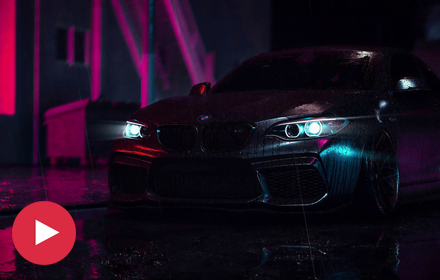
Most people never touch their Chrome new tab page. It just sits there, blank, between every search and every bookmark. Black Car Neon Wallpaper gives that page somewhere to go: a rain-slicked street, pink and blue light bouncing off wet asphalt, and a black car parked in the middle of it with its headlights cutting through the glow.

It’s a free Chrome extension for anyone who’d rather open a tab into a night city scene than a search box on white.
Features
Animated black car wallpaper. The centerpiece of the extension. Rain keeps falling, light keeps flickering off the paint, nothing about it sits still the way a photo would.
HD and 4K quality. Clean on a laptop screen, sharper still on a bigger monitor.
A full neon wallpaper collection. Beyond this one car, the gallery holds a wider set of neon-lit streets, night drives, and city scenes.
Shuffle mode. Flip it on and a different scene loads with every new tab, so the page doesn’t go stale after the fifteenth one you’ve opened today.
Custom uploads. Swap in your own photo whenever you want a break from the built-in gallery.
A clock, date, and search bar sitting right on top of the scene, so the new tab still works the way Chrome expects it to.
Quick links to bookmarks, history, and your most visited sites, no extra tab required.
A notes and to-do panel for jotting things down without leaving the page.
Weather, right there on the tab.
Offline support. Once the wallpapers are cached, they load with no connection at all.
Barely any footprint. Chrome opens just as fast with this running as it did before.
How to Download
- Find Black Car Neon Wallpaper on the Chrome Web Store.
- Click Add to Chrome.
- Approve the permissions prompt.
- Open a new tab. The scene loads on its own.
No account, no separate installer, no extra steps hiding behind the first one.
How to Use
The wallpaper shows up automatically the moment you install it. From there:
- Click the gallery icon tucked in the corner of the new tab page.
- Look through the black car, neon street, and night city categories.
- Pick a scene to lock it in, or turn shuffle on and let the gallery rotate on its own.
Want your own photo instead? Use the upload option in that same panel. Done with the extension? Right-click its icon in the toolbar and choose Remove from Chrome.
Frequently Asked Questions
Does it cost anything? No. The whole gallery, shuffle mode, and every feature are free, no upgrade wall anywhere.
Will it drag down my browser? No. Wallpapers cache after the first load, so Chrome opens at the same speed it always has.
Can I use it without wifi? Yes, as long as the scene has already loaded once. After that it’s stored locally.
What does it actually track? Just what it needs to show a wallpaper on your new tab. No login, no reading through your other browsing.
Can I set my own picture as the background? Yes, through the upload option in the gallery panel.
Is the car tied to a specific brand or model? No. It’s an original night-drive scene built for atmosphere, not a promotion for any particular manufacturer.
Why Fans Keep This One Installed
A black car sitting under neon light is one of those images that needs to breathe a little to actually land. Freeze it and it’s just a car in a parking lot. Let the rain keep falling and the light keep shifting across the hood, and suddenly it feels like a frame pulled out of a film you’d want to watch the rest of.
That’s the gap this extension is built to fill. No dashboard crowding the scene, no pop-up begging for an email address, nothing between you and the tab you actually wanted to open. Just a clock, a search bar, quick links, and a rotating set of neon-soaked night scenes doing the one job a new tab background is supposed to do.
For anyone who slows down for a good night-drive shot, that’s really the whole pitch.

Community comments
Comments are reviewed before they appear publicly.