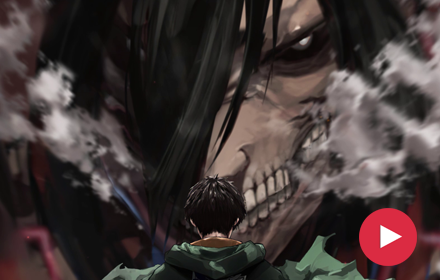
Chrome’s new tab page is the one screen you see more than almost anything else, and most people never bother to change it. Attack on Titan Live Wallpaper does something about that. It swaps the blank page for an animated HD scene of Eren Yeager standing before the towering, skeletal face of his Titan form, smoke curling through the shot.

It’s a free Chrome extension built for Attack on Titan fans who want their browser to carry a little of that same dread.
Features
Animated Eren Yeager Titan wallpaper. The centerpiece of the extension, with real motion instead of a still image cropped to fit the tab.
HD and 4K quality. Sharp on standard monitors and holds up cleanly on higher-resolution displays.
A wider Attack on Titan wallpaper gallery. Beyond the Eren and Titan scene, the collection includes other dark, atmospheric AOT-inspired backgrounds.
Shuffle mode. Turn it on and a new wallpaper loads with every tab, so the page doesn’t sit frozen on one frame all day.
Custom uploads. Set your own image as the background whenever you want something other than the built-in gallery.
Built-in utilities. A clock, date, and search bar sit over the wallpaper, so the new tab page still does its job.
Quick links. Bookmarks, browsing history, and your most visited sites are one click away.
Notes and a to-do list. A small panel for writing things down without switching to another app.
Weather. Local conditions show up directly on the new tab.
Offline support. Wallpapers load without a connection once they’ve been cached.
Lightweight. No noticeable effect on how fast Chrome opens, shuffle mode included.
How to Download
- Open the Chrome Web Store listing for Attack on Titan Live Wallpaper.
- Click Add to Chrome.
- Confirm the permissions prompt.
- Open a new tab. The wallpaper loads automatically.
No account required, no separate download, nothing standing between you and the extension besides one click.
How to Use
Once installed, a wallpaper appears on every new tab by default. To choose a specific one:
- Click the gallery icon in the corner of the new tab page.
- Browse the Eren Yeager, Titan, and wider Attack on Titan categories.
- Select a wallpaper to set it, or turn on shuffle mode and let the extension rotate through the gallery on its own.
To use your own image instead, pick the upload option in the same panel and select a file from your device. To remove the extension, right-click its icon in the Chrome toolbar and choose Remove from Chrome.
Frequently Asked Questions
Is this extension free? Yes. There’s no paid tier and nothing locked behind a purchase in the wallpaper gallery.
Will it slow down my browser? No. Wallpapers cache locally after the first load, so new tabs open at normal speed.
Does it work offline? Yes, once the wallpapers have loaded once. After that, they’re stored on your device.
What data does the extension collect? It only needs new tab access to display wallpapers. It doesn’t ask for login credentials or reach into unrelated browsing data.
Can I upload my own wallpaper? Yes. The upload option lets you set any image from your device as the new tab background.
Is this an official Attack on Titan product? No. This is a fan-made new tab theme. It isn’t affiliated with, endorsed by, or sponsored by Hajime Isayama, Kodansha, Wit Studio, MAPPA, or Attack on Titan’s rights holders. All character rights belong to their respective owners.
Why Fans Love This Extension
The moment Eren turns to face his own Titan form is one of the most unsettling images in the entire series, and a static wallpaper usually flattens that tension into something closer to a poster. This one doesn’t. The smoke keeps drifting, the shadows keep shifting across that skeletal face, and the scene holds onto the same dread it had on screen instead of freezing it.
The extension also keeps things simple. There’s no dashboard bolted on top of the wallpaper, no pop-up asking for a newsletter signup, nothing competing with the scene for attention. Just a clock, a search bar, quick links, and a rotating set of Attack on Titan backgrounds doing exactly what a new tab page is supposed to do.
For anyone who still gets a chill from that scene, that’s the whole appeal.
Community comments
Comments are reviewed before they appear publicly.