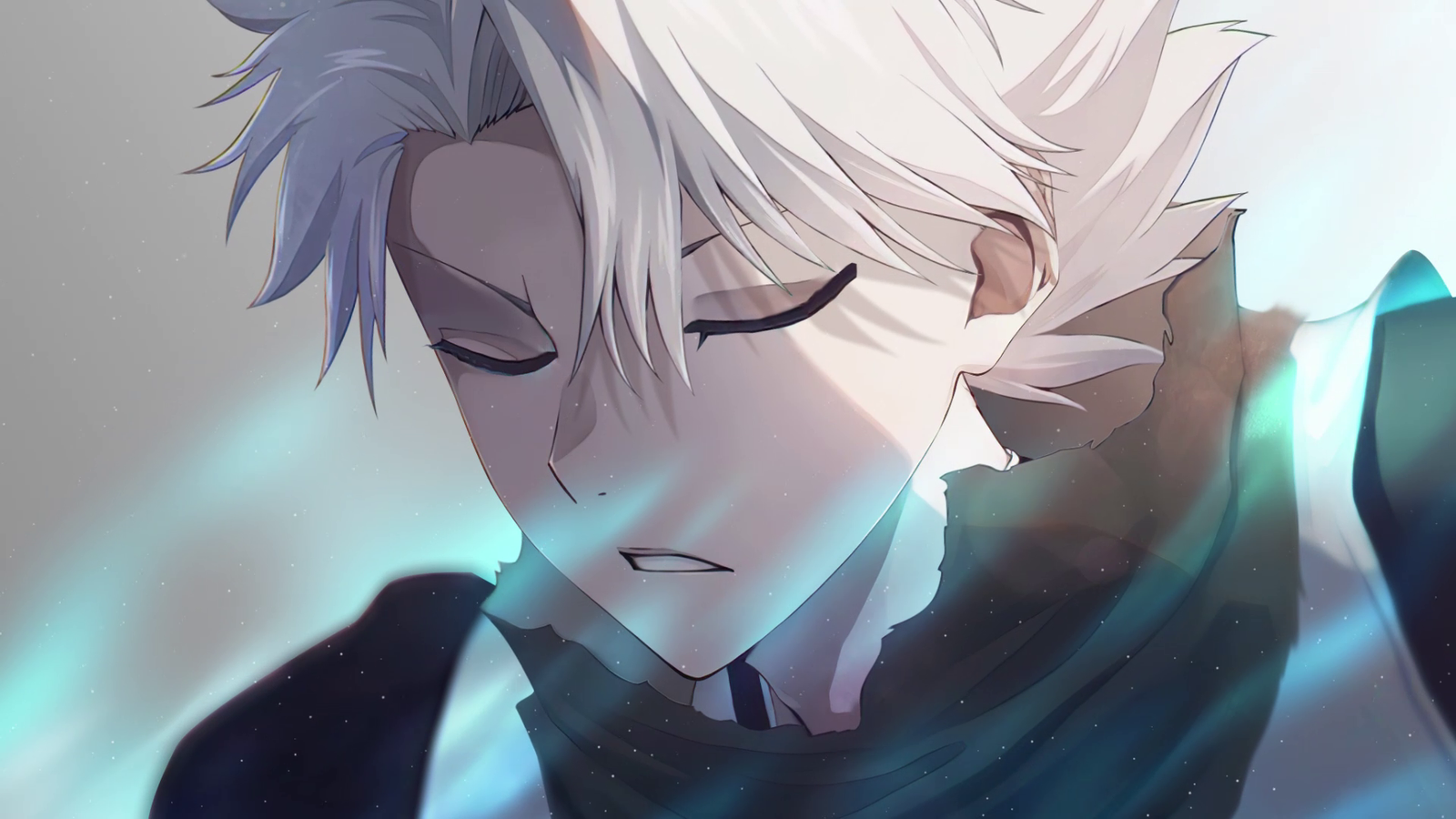
Most people leave their Chrome new tab page blank without a second thought. Toshiro Hitsugaya Live Wallpaper gives it something worth stopping for instead: an animated HD scene of Captain Hitsugaya standing ready, his sharp turquoise eyes locked forward as pale blue energy drifts across the frame.
It’s a free Chrome extension for Bleach fans who’d rather open a tab into that moment than a search box on white.
Features
Animated Toshiro Hitsugaya wallpaper. The centerpiece of the extension. The pale blue light shifts across his face, cool energy drifts through the frame, nothing about it sits frozen the way a still image would.
HD and 4K quality. Sharp on a laptop screen, sharper still on anything bigger.
A wider Bleach wallpaper gallery. Beyond Hitsugaya, the collection includes other captains, Shinigami, and scenes pulled from across the series.
Shuffle mode. Flip it on and a new scene loads with every tab, so the page keeps changing instead of sitting on one captain all day.
Custom uploads. Drop in your own image whenever you want a break from the built-in gallery.
A clock, date, and search bar layered over the scene, so the new tab page still does its job.
Quick links to bookmarks, browsing history, and your most visited sites.
A notes and to-do panel for jotting things down without switching tabs.
Weather, shown right on the page.
Offline support. Once a wallpaper’s cached, it loads with no connection needed.
Barely any weight. Chrome opens at the same speed with this running as it did before.
How to Download
- Search for Toshiro Hitsugaya Live Wallpaper on the Chrome Web Store.
- Click Add to Chrome.
- Approve the permissions prompt.
- Open a new tab. The scene loads on its own.
No account to set up, no separate app, nothing standing between clicking install and seeing Hitsugaya on your next tab.
How to Use
The wallpaper appears the moment you install it. From there:
- Click the gallery icon in the corner of the new tab page.
- Look through the Hitsugaya, captains, and wider Bleach categories.
- Pick a scene to set it, or switch on shuffle and let the gallery rotate through the collection on its own.
Prefer your own image instead? Use the upload option in that same panel. Ready to remove the extension? Right-click its icon in the Chrome toolbar and choose Remove from Chrome.
Frequently Asked Questions
Is it free? Yes. Every wallpaper, shuffle mode, and the rest of the gallery come with no cost attached.
Does it slow down my browser? No. Wallpapers cache locally after the first load, so new tabs open at the usual speed.
Can I use it without an internet connection? Yes, once the scene has loaded at least once. From there it’s stored on your device.
What information does it collect? Only what it needs to display a wallpaper on your new tab. No login required, no access to unrelated browsing.
Can I upload my own image? Yes, through the upload option inside the gallery panel.
Is this an official Bleach product? No. This is a fan-made new tab theme. It isn’t affiliated with, endorsed by, or sponsored by Tite Kubo, Shueisha, Studio Pierrot, or Bleach’s rights holders. All character rights belong to their respective owners.
Why Fans Keep This One Installed
Hitsugaya has one of the more restrained presences among the Bleach captains, and a still image tends to lose the quiet weight he carries into every scene. Freeze the frame and it’s just a portrait. Let the pale blue energy keep drifting and the light keep shifting across his face, and it turns into something closer to catching him mid-thought, right before he draws his sword.
The rest of the page stays out of the way. No dashboard of widgets crowding the view, no pop-up asking for an email, nothing pulling attention off the scene itself. Just a clock, a search bar, quick links, and a rotating set of Bleach wallpapers doing what a new tab background is supposed to do.
For anyone who still counts Hitsugaya among their favorite captains, that’s the whole appeal.

Community comments
Comments are reviewed before they appear publicly.